OnePageCRM


- Industry
- Software
For OnePageCRM, great customer support starts with context. Having the full customer relationship alongside every conversation allows the team to respond thoughtfully and with confidence — even when customer needs are complex.
The company has been a Help Scout customer since 2013, and more than a decade later, the platform still plays a central role in how OnePageCRM delivers thoughtful, responsive support.
"I live in Help Scout," says Carmel, a passionate Customer Success Team Leader at OnePageCRM.
Whether it’s responding to a question on the website or working directly in the help desk, Help Scout brings every customer interaction into one place. The platform also enables seamless collaboration across support, accounts, and product teams. When the Marketing team is sending email campaigns from a customized email address or the payments team is sending out billing reminders, all replies go to Help Scout — each team even has a separate Inbox.
To make communications more personalized, OnePageCRM launched a native integration with Help Scout, aligning support conversations with sales activity and providing all of their teams additional background when working with customers.
"Before Help Scout, we were on a complicated help desk solution. It was difficult to navigate, access the features that we actually needed, and it was time consuming," said Carmel. "Now, it’s easy to communicate with our customers. Our Inboxes are easy to monitor, and we’ve reduced our workload by 50%, making our team twice as productive."

Layering in live chat and self-service
While email is a tried and true channel, some communication is better performed live. In 2022, the team decided to migrate their live chat channel from Olark to Help Scout, successfully rolling out Beacons across multiple sites. By moving chat to Help Scout, the OnePageCRM team always has easy access to their customers’ conversation history, regardless of channel, ensuring a better support experience.
In addition to chat, the company also uses Help Scout’s knowledge base product, Docs, to help customers find the information they need, even when their team is offline.
Help Scout Docs has become the backbone of our help content — it makes it easy to manage, update, and reference in real-time conversations.
Gosia FitzGerald
Co-founder, OnePageCRM
Reporting for key insights
Help Scout's reports also play a key role in OnePageCRM's support operations. "Reporting gives us data to make smarter, more informed decisions," explained Carmel. "With Conversation Reports, we can get a useful overview of the most popular types of queries received. It gives us a breakdown of the tagged conversations and saved replies used for a particular timeframe."


Carmel also finds the reports helpful for managing staffing. "We can see how many conversations each rep answers per day, week, or for a specific date range. We can also see when during the day it's busiest. We were able to easily identify the volume of conversations received for a particular time zone and it quickly highlighted the need to recruit an extra support person to help with the overflow during those business hours."
Automation, AI, and consistency at scale
When it comes to automation, Gosia FitzGerald, OnePageCRM co-founder, said, “Workflows and the Send Later feature help us deliver consistent, proactive follow-ups to systemize our support processes.”
The team has also started to incorporate some AI features, most notably AI Answers, Help Scout’s self-service chatbot.
“We were initially hesitant about chat bots," explained FitzGerald, "but Help Scout’s AI Answers have been surprisingly effective, leveraging our help docs to deliver helpful, accurate responses in 86% of cases.”
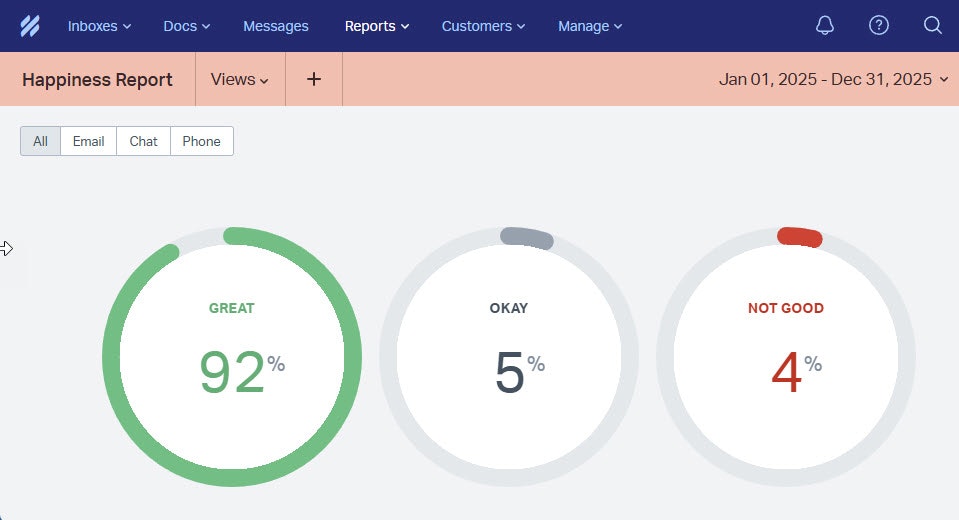
Across chat and email, OnePageCRM continues to maintain a 92% Happiness Score, reflecting both the team’s commitment to customers and the reliability of the Help Scout platform.

OnePageCRM’s favorite features
Saved replies: Reply in two clicks and gain back problem-solving time.
Send later: Schedule replies to stay consistent and proactive with follow-ups.
Workflows: Use if/then rules to automate routine tasks and cut down on busywork.
Tags: Organize conversations, track trends, and trigger workflows.
Office hours: Set your business hours so customers know when you’re available.
Reports: See when your team is busiest and adjust schedules as needed.
AI Answers: Give customers instant answers using your knowledge base and website content.

Like what you see? Share with a friend.
Help Scout
Help Scout is the most intuitive customer support platform for growing businesses. It brings context, collaboration, and AI inside the flow of support so teams can deliver fast, exceptional support at scale.
Explore the platform for yourself with a free trial or live demo. Not ready for a trial? Follow us on LinkedIn to see what we’re up to!


