Help Scout vs. Zendesk: A Deep-Dive Comparison

If you're shopping for customer service software and comparing Help Scout vs. Zendesk, this comprehensive comparison of features, pricing, use cases, and support will make it easy to determine which tool is the best fit for your business.
At Help Scout, we only publish deeply researched, human-written content. If you find our content to be as helpful as we strive to make it be, you can set us as a preferred source in Google so you'll see our content surfaced more often when you're searching.
Quick look: Who is Help Scout best for vs. who is Zendesk best for?
Help Scout is best for companies with 500 or fewer employees, particularly those that depend on customer retention and ongoing relationships rather than one-time transactions. It's intuitive to use, more affordable than Zendesk, and designed so that every support interaction helps teams build customer trust and loyalty.
Zendesk is ideal for large and enterprise businesses that need deep customization. It's built for handling complex support workflows, managing high ticket volumes, and organizing very large support teams. It costs more and requires more effort to set up, but the payoff is near-limitless customization.
Recommended Reading
Help Scout vs. Zendesk feature comparison

Both Help Scout and Zendesk let you deliver support on the major channels: email, live chat, self-service, SMS, and social. Help Scout includes these channels in all of its paid plans, starting at $25/user per month. Zendesk plans that include all of these channels start at $55/agent per month. As for self-service, both products let you create knowledge bases, launch AI agents, and build customer portals.
Zendesk also offers phone and community support. Phone support is available on Zendesk's Suite Team plan at $55/agent per month (with additional usage fees for phone numbers, calls, voicemails, and transcriptions). Community forums are available on the Suite Professional plan at $115/agent per month.
If phone support or community forums are must-haves for your business, Zendesk will be the better option. If you don't need to offer phone or community forum support, Help Scout is more affordable.
Channel pricing comparison
| Channel | Help Scout's starting price | Zendesk's starting price |
|---|---|---|
One shared inbox included in the free plan; paid plans start at $25/user per month | $19/agent per month | |
Live chat | $25/user per month | $19/agent per month |
Knowledge base | One help center included in the free plan; paid plans start at $25/user per month | $55/agent per month |
Facebook Messenger | $25/user per month | $55/agent per month |
$25/user per month | $55/agent per month | |
X | Not available | Public comment management for $19/agent per month; DM management for $55/agent per month |
$25/user per month | $55/agent per month | |
Phone | Via integration only | $55/agent per month plus additional usage fees |
SMS | $25/user per month (plus any Twilio usage fees) | $55/agent per month plus additional usage fees |
Community forums | Not available | $115/agent per month |
Customer portals | $45/user per month | $115/agent per month |
Conversation management features

Both Help Scout's shared inbox and Zendesk's ticketing system centralize all support requests from all channels, giving your team a single place to see and manage all customer inquiries.
Both tools offer features that make it easier to route, manage, and respond to requests:
Workflows that automatically route and sort requests.
Tags that let you label and filter requests.
Views that group together conversations that meet specific criteria (tags, assignees, etc.).
Customer profiles that show key information about the person requesting support.
Auto-replies that let customers know their requests have been received.
Ticket assignments that let you assign specific tickets to specific agents.
Saved replies that let you create canned responses to frequently asked questions.
Round-robin and load-based routing to distribute incoming requests to your team members equally.
SLAs to help you ensure that you're meeting your commitments and getting back to customers in a reasonable timeframe.
Zendesk does offer a skill-based routing feature that you won't find in Help Scout.
Knowledge base and self-service features


Both Help Scout and Zendesk let you create customer knowledge bases. At least one help center is included in all of Help Scout's plans, while Zendesk plans that include a knowledge base start at $55/agent per month.
Both products let you create articles and sort them into collections. Both offer built-in search features, give you access to revision histories, let you customize the design of your help center, and are set up to be optimized for search engines.
Zendesk does have a couple of self-service features you won't find in Help Scout, such as approval/publishing workflows (available on the Suite Enterprise plan) and community forums (available on the Suite Professional plan).
Collaboration features
Both Help Scout and Zendesk offer lots of features that make it easy for your teams to collaborate on requests:
Collision detection to see when another agent is already working on a request.
Internal notes to provide additional context when assigning a request to someone else.
Mentions to tag teammates on requests and notify them that their help is needed.
Teams to create groups of agents who work on specific types of requests.
Both Zendesk and Help Scout also offer light agents/users — a role with limited permissions that allows support to collaborate with other teams (engineering, finance, product management, etc.):
Zendesk's Suite Professional plan includes 100 light agents. You can also add light agents to Zendesk’s Suite Team plan by purchasing an add-on.
Five light users are included in Help Scout's Plus plan, and 15 are included in the Pro plan. You can also purchase additional light users if needed.
Reporting and analytics features


Both Help Scout and Zendesk offer pre-built and custom reports — as well as report exporting — so you can easily track your KPIs and monitor volume trends overall and by channel. Both also offer office hours, which is a way to define the times when you offer support so your reports aren't negatively impacted by days/times when no one is working.
Zendesk does offer a couple of features you won't find in Help Scout, such as benchmarks (a way to compare your performance to other companies like yours, available on all plans) and custom data explorations, available on the Suite Professional plan.
AI features

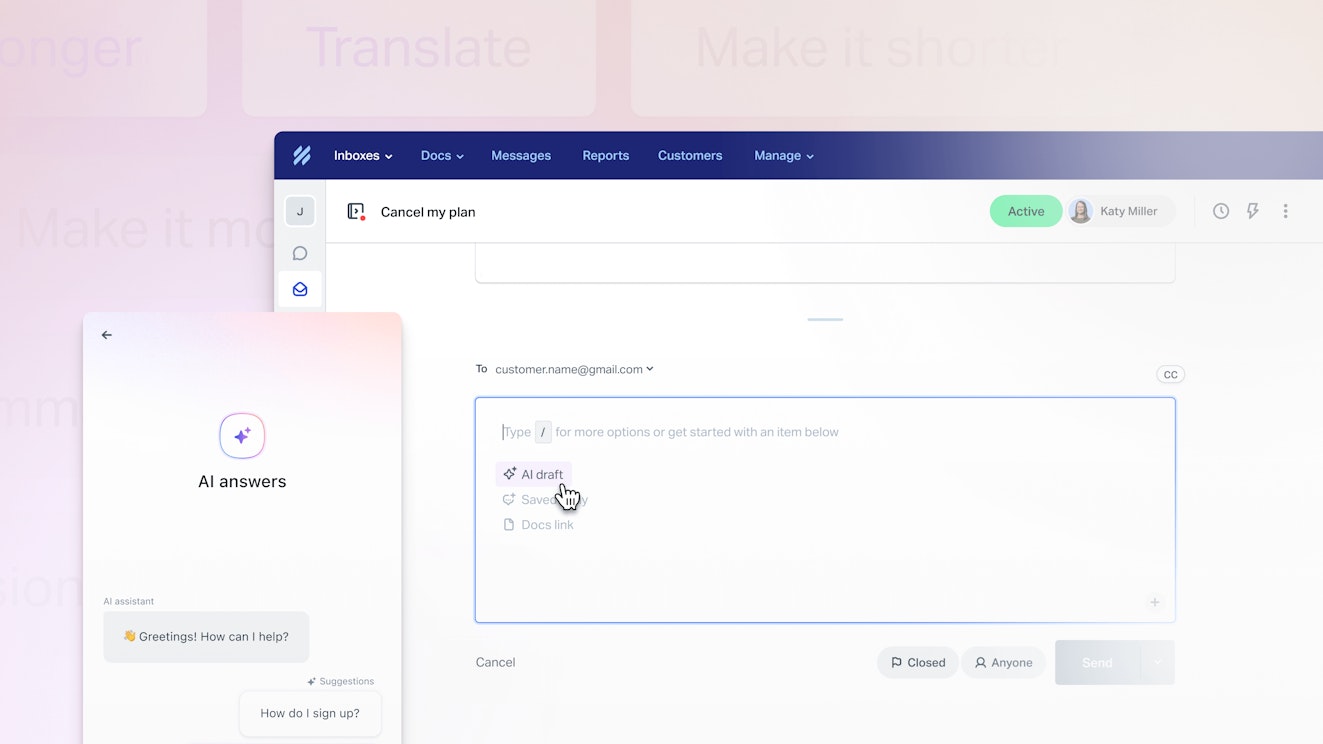
Help Scout and Zendesk both have several AI features.
Both offer AI agents that can answer customer questions instantly. Help Scout's agent can answer questions over live chat and will be available via email soon. Zendesk's AI agents can answer customer questions across all of the channels the platform supports, including phone.
Additionally, Zendesk's AI agents can take action in connected systems. For example, you can connect it to your CRM to let AI agents update customer information or to your billing system to let it process refunds. Help Scout's AI agents do not take action on customer requests.
Both tools also offer AI copilot features:
In Help Scout, you can use AI to automatically draft replies to requests that your team can review and edit if necessary before sending. AI copilots can draft replies in Zendesk, but they can also provide guidance to your team, suggest next steps, and execute approved actions.
Both tools let your team use AI to refine responses they've already written, making them shorter/longer, adjusting the tone, or translating the text into other languages. Help Scout also offers a pre-built prompt for cleaning up spelling and grammar issues, while Zendesk lets your team enter custom prompts for cleaning up copy issues or directing the AI to make other changes.
Both tools let you use AI to generate summaries of long back-and-forth support conversations.
In addition to the features that the products both offer, Zendesk also has an admin copilot that offers recommendations for workflow improvements.
Finally, both tools offer ways to use AI to classify incoming tickets. Help Scout will automatically classify incoming tickets into topics that can be used to trigger workflows and gather insights. Zendesk automatically classifies tickets by topic, entity, sentiment, and language. Additionally, both tools let you connect to an MCP server to access data from your help desk in your preferred LLM.
There are a couple of additional AI features in Zendesk that you won't find in Help Scout. Its Workforce Engagement Bundle lets you use AI to QA all of your support interactions, to forecast support demand, and to automatically schedule agents.
Help Scout vs. Zendesk pricing comparison
Both Help Scout and Zendesk use hybrid pricing models. The base software for both products is user-based, meaning your per-month price will increase as you add new users to your account. However, pricing for their AI chatbots is usage-based, meaning you'll pay more based on the number of requests that your AI assistants resolve.


Help Scout has four pricing packages:
Free: $0/month for up to 5 users.
Standard: $25/user per month.
Plus: $45/user per month.
Pro: $75/user per month.
All of Help Scout's paid plans let you deliver support across email, live chat, SMS, self-service, Instagram, Facebook Messenger, and WhatsApp.
As far as usage-based pricing goes, Help Scout's AI agents start at $0.75/resolution after a three-month free trial. AI Assist (which lets your team refine replies they've already written) is included in all paid plans at no additional cost, and AI Summarize (summarize conversations) and AI Drafts (use AI to write a draft reply to a conversation) are both included in the Plus and Pro plans at no additional cost.


Zendesk also has four pricing packages:
Support Team: $19/agent per month.
Suite Team: $55/agent per month.
Suite Professional: $115/agent per month.
Suite Enterprise: Contact for pricing.
The only channels included in Zendesk's Support Team plan are email and live chat. To create a knowledge base or deliver support via DMs on social channels, messaging platforms, or phone, you'll need to be on the Suite Team plan or higher.
For usage-based pricing, five automated resolutions per agent per month are included in the Support Team and Suite Team plans, and 10/agent per month are included in the Suite Professional plan. Additional automated resolutions start at $1.50/resolution.
Zendesk's AI copilot features are only available for purchase if you're on the Suite Professional plan or higher. The admin copilot and ticket classification features are included in that plan, as well as five uses of refining replies per agent per month. For all other features, you have to purchase the Copilot add-on, which is an additional $50/agent per month.
To get access to Zendesk's AI Quality Assurance and Workforce Engagement Management features, you'll need to purchase the Workforce Engagement Bundle, which costs an additional $50/agent per month.
Overall, Help Scout is much more affordable than Zendesk. Help Scout's free plan is comparable to Zendesk's base plan that costs $19/agent per month, Help Scout's paid plans run at least $30 less per user than Zendesk's Suite plans, Help Scout's AI resolutions are half the cost of Zendesk's, and Help Scout's copilot features are included in the price of its plans, while Zendesk's are sold as add-ons.
What customers say about Help Scout's and Zendesk's pricing
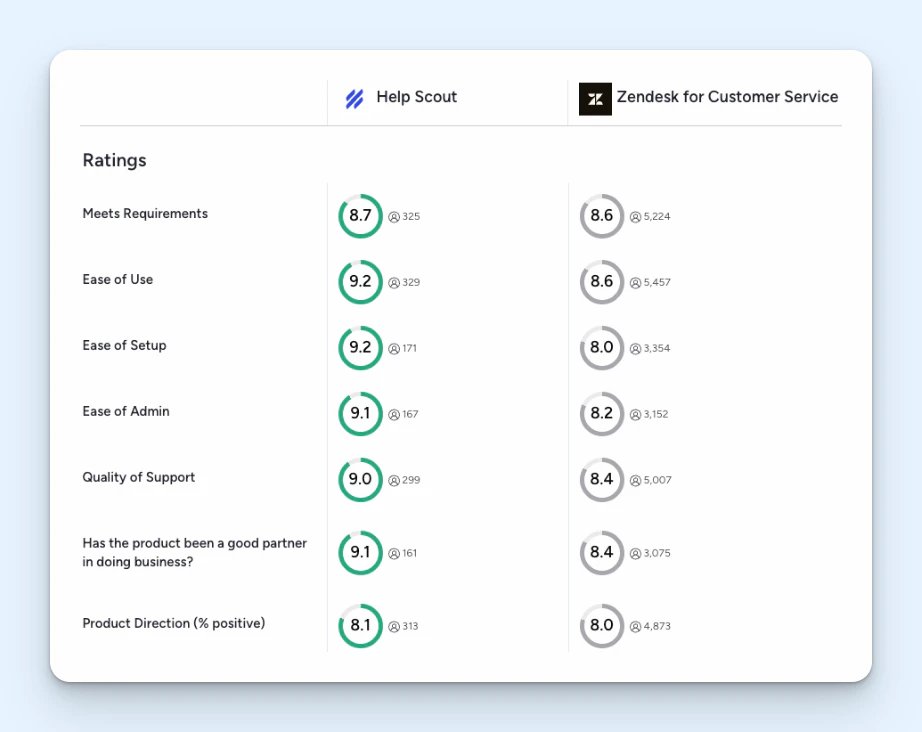
Help Scout has a higher rating on Capterra for “value for money” with a 4.4 out of 5 stars versus Zendesk's 4.2 out of 5 stars. As one Help Scout customer writes:
"I love that you get so much included in the price, but also that the products offered are of high quality and an asset to the business: knowledge base, live chat with Beacon, the email management system, plus all the ways you can organize and sort your incoming messages.”
Ease of use and setup


When comparing Help Scout vs. Zendesk in terms of ease of use and setup, Help Scout is the clear winner. You can learn how to use Help Scout in a day and become a power user in a week, and it's so intuitive that very little training is required for agents.
One Help Scout customer writes: “What I like most about Help Scout is the ease of use. Help Scout is easy to set up and, in most cases, you can avoid working with your IT team. Help Scout also has a very intuitive interface, which makes training your team easy! The Help Scout team got it right!”
Zendesk’s wide range of features makes setting it up, using it, and training new agents on it much more cumbersome. In fact, one of its partners estimates that implementing Zendesk takes a minimum of four weeks, plus an additional week for every 10 agents on your team.
Zendesk customers also report that IT support is also frequently needed to set up some of the platform's more complex features.
Integrations


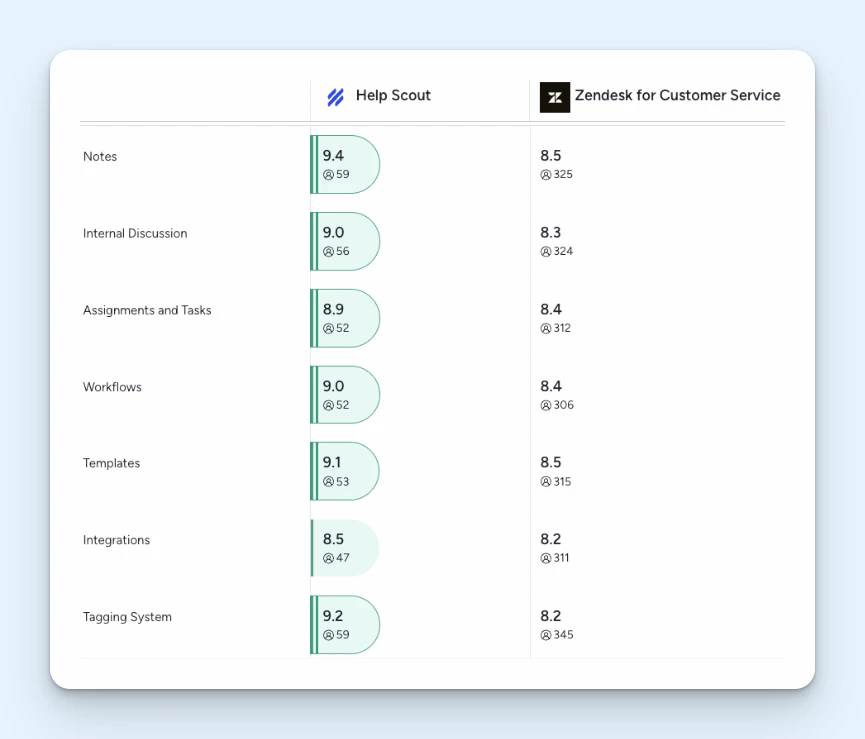
When it comes to integrations, while Help Scout has a higher customer rating (8.5/10) on G2 than Zendesk (8.2/10), Zendesk offers far more integrations overall.
Help Scout has around 100 integrations with the primary tools teams want to connect to their support systems: Slack, HubSpot, Salesforce, Aircall, Shopify, Jira, Linear, etc. Zendesk's Marketplace, on the other hand, has nearly 2,000 different integrations with both the big-name tools and smaller, more niche systems.
Scalability
Zendesk is built to scale no matter how large your organization grows. However, it's best if cost isn't a concern as you scale: Getting access to many of its more complex features will require you to upgrade to higher-cost plans or purchase add-on products.
Help Scout is also highly scalable and a strong choice for teams of any size that prioritize ease of use. It will help you scale as much as you need to without breaking your budget or degrading the support experience.
Customer support


When it comes to quality of customer support, Help Scout is the clear winner. It's rated much higher for quality of support on both G2 and Capterra, with customers writing glowing reviews like this one: “The customer support is over-the-top, amazing, above-and-beyond helpful. These are not clichés, they should be taken literally.”
Every user at your company can contact Help Scout's support team 24/6 via email, there are live training classes offered every week, and if you want to self-serve, you can access the platform's comprehensive knowledge base or get answers instantly from its AI agent.
Zendesk's support isn't always rated highly, and it can take a long time to get a reply to a question. Given its steeper learning curve, this often means teams have to purchase Zendesk's professional services add-on to get the help they need or pay for consulting from one of Zendesk's partners.
Quick guide for choosing between Help Scout and Zendesk
If all of the information above didn't make it clear which platform is the best for your team, here's a final summary to help you choose the right option:
If you have 500 or fewer employees and want something that's intuitive to use, choose Help Scout. If you have more than 500 employees and need enterprise-grade features, choose Zendesk.
If you plan to do most of your support via text-based channels, choose Help Scout. If you need to deliver phone support, choose Zendesk.
If you're looking for a more affordable system, choose Help Scout. If budget is less of a concern for you than system customizability, choose Zendesk.
If you need a system that's quick to set up, choose Help Scout. If you have dedicated IT resources or don't mind paying for outside help to set up and customize the system, choose Zendesk.
If you want access to quick, helpful support when you need it, choose Help Scout. If you're more of a figure-it-out yourself organization, choose Zendesk.
| Evaluation category | Help Scout | Zendesk |
|---|---|---|
Who it's best for | Companies with fewer than 500 employees | Companies with more than 500 employees |
Support channels | Email, live chat, self-service, SMS, and social included in all paid plans. | Email, live chat, self-service, social, phone, SMS, and community forms are available. Different channels are packaged into different pricing plans. |
Knowledge base | Offers a simple, easy-to-use knowledge base builder. | Includes approval workflows for collaborative publishing. |
Reporting | Offers straightforward, easy-to-read reports on key metrics. | Provides more advanced and customizable reporting and analytics dashboards. |
AI features | Agent usage pricing is $0.75/resolution; one or more copilot features are included in all paid plans. | Agent usage pricing starts at $1.50/resolution; copilots are sold as add-ons with additional per-user costs. |
Ease of use | Known for its user-friendly interface and ease of setup. | Can be more complex to set up and navigate due to its extensive features. |
Integrations | Offers 100+ integrations with popular tools. | Offers nearly 2,000 integrations with a large variety of third-party tools. |
Customer support | Known for its high-quality and responsive customer support. | Many customers express frustration with the support they get from Zendesk's team. |
Both Help Scout and Zendesk are leaders in the customer support space, and you really can't go wrong with either choice. Consider the differences between the two platforms, select the platform that feels like it will best support your business’s unique needs, and then start a trial to make sure that it works for you both in theory and in practice.
Like what you see? Share with a friend.
Jessica Greene
Jessica Greene is a Help Scout alum, where we make excellent customer service achievable for companies of all sizes. Connect with her on LinkedIn or through her website.


