The 7 Best Ecommerce Help Desks for Customer Support



Delivering great customer support in ecommerce starts with a great help desk. It helps you consolidate inquiries from multiple channels into a central queue, makes it easy to collaborate with others to respond to requests, and gives you features to reply faster, measure performance, and even manage orders.
To help you find the right tool for your team, we've put together this list of the seven best ecommerce help desks. Whether you're a one-person shop selling handmade crafts, a major retailer selling merchandise both in person and online, or anything in between, you'll find an option below to meet your needs perfectly.
| Platform | Best for | Free Trial | Pricing |
|---|---|---|---|
Help Scout | Companies with custom order management and fulfillment systems | 15 days | Free plan available; paid plans start at $25/user per month |
Gorgias | Brands that use Shopify to manage and fulfill their orders | 7 days | Plans start at $10/month for up to 50 tickets/month |
eDesk | Companies that sell on Amazon, eBay, Walmart, Etsy, and/or TikTok Shop | 14 days | Plans start at $39/agent per month |
Gladly | Major retailers that sell their products both in person and online | Not offered | Contact Gladly for pricing |
Shopify Inbox | Small ecommerce merchants using Shopify as their ecommerce platform | N/A | Included for free on all Shopify plans |
WSDesk | Small ecommerce brands using WooCommerce to sell products | N/A | Free version available; paid plans start at $99/year |
Outvio | Companies that want a single, consolidated platform for multiple functions | Not offered | Plans start at $150/agent per month |
1. Help Scout – Best for companies with custom order management systems and fulfillment processes

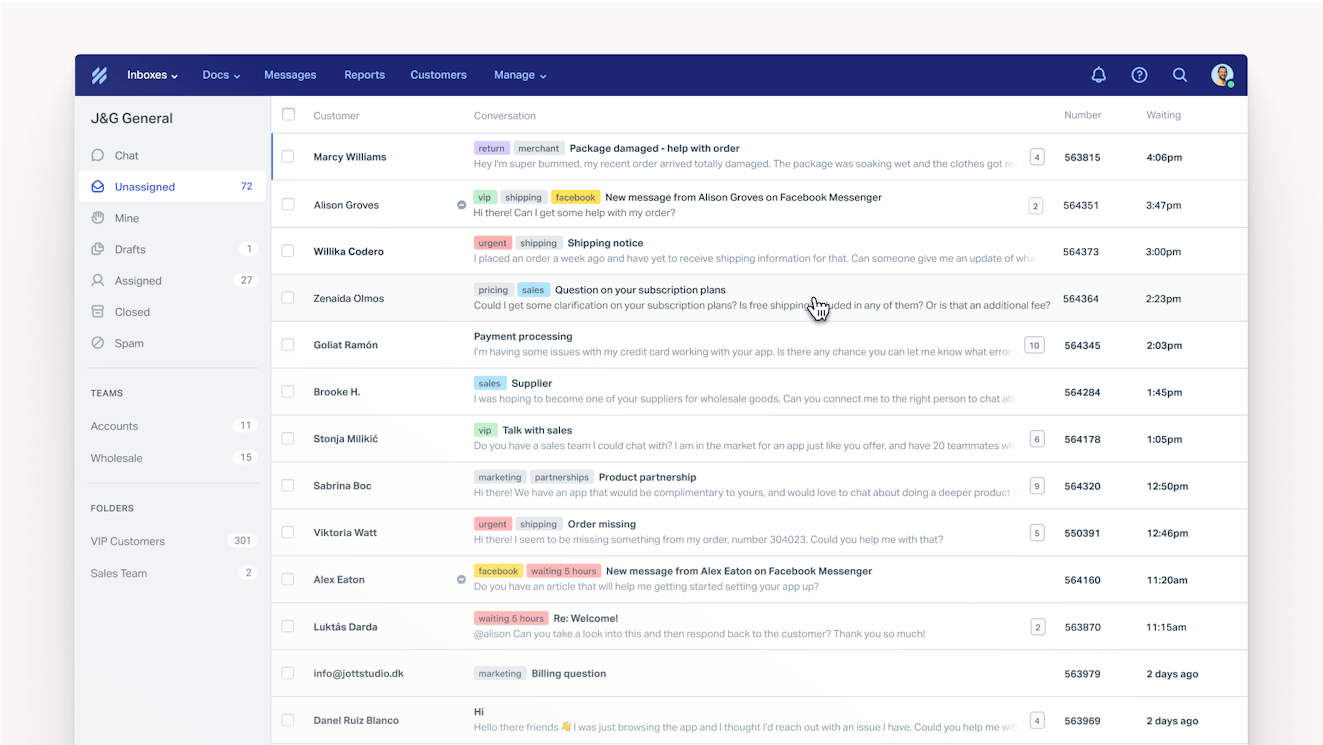
Most help desks on the market, including Help Scout, integrate with popular ecommerce platforms like Shopify, WooCommerce, and Magento. Those integrations are great for brands using those systems, but they miss the mark if you've built your own custom order management system (OMS), do your own fulfillment, or have fulfillment integrations that go beyond a simple plug-and-play setup.
For teams with custom setups, Help Scout shines. Its robust API, combined with its Webhooks feature, lets teams with custom OMSs and fulfillment processes connect those systems to your help desk so information can pass back and forth between them. For example, you can:
Link support tickets to orders. When a new conversation is created, your OMS can parse the customer's email, look up their recent orders, and push that order data back into Help Scout.
Trigger fulfillment holds or changes. If a customer writes in asking you to change their shipping address or cancel an order before it ships, a webhook connected to your fulfillment system lets you make that change instantly without leaving Help Scout.
Sync support tickets to orders. By linking support requests to orders in your OMS, your fulfillment team can view orders that had support issues, which can be useful for spotting recurring problems with a product or a specific shipping carrier.
Automate returns and exchanges. When a field on a conversation gets updated (e.g., marked as "return requested"), a webhook can kick off your returns workflow, generating a return merchandise authorization number, creating a shipping label, or updating inventory projections.
This all saves your support team from having to toggle back and forth between multiple systems. Instead, they can take action on requests as soon as they receive them, viewing the details that are necessary in order to personalize replies and making sure all systems are up to date with the latest information.
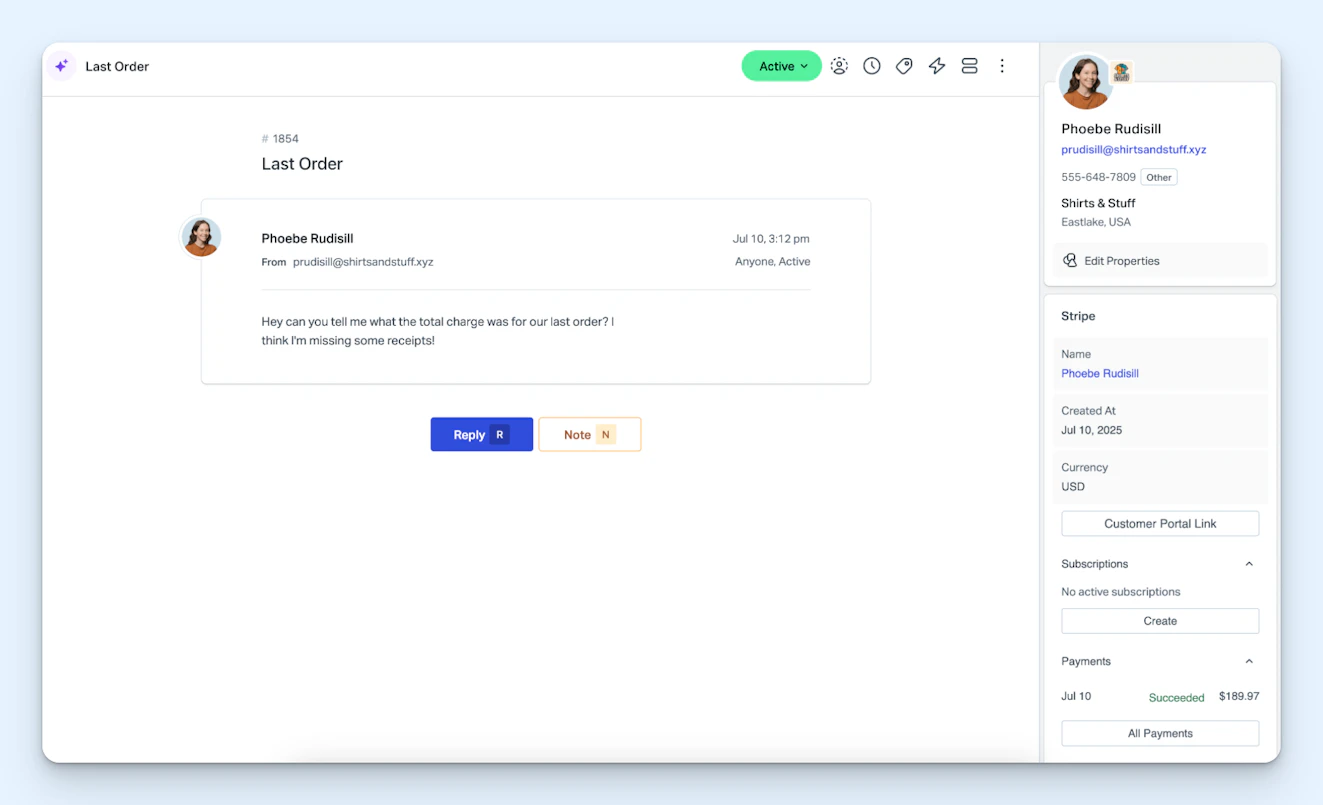
Additionally, Help Scout's Stripe integration is useful for subscription ecommerce companies. Once the Stripe integration is installed, you can view the status of a customer's subscription, create a new subscription, view recent invoices and payments, issue full and partial refunds, and create Stripe self-service portal links for customers — all within Help Scout's sidebar.

Help Scout's key features for ecommerce teams
Deliver email, live chat, and social (Facebook Messenger, Instagram, and WhatsApp) support from a single system.
Integrate with Shopify, WooCommerce, and Magento, or use the API and webhooks to connect Help Scout with a custom order management or fulfillment system.
Create a knowledge base and launch an AI-powered chatbot to make it easy for customers to get quick answers to their questions on their own.
Use AI to draft replies to support tickets in seconds, summarize long back-and-forth exchanges, translate replies into other languages, and clean up spelling, grammar, and tone issues.
Access in-depth reports that will help you understand when it's time to hire, which team members need more coaching, what knowledge base articles need to be updated, and much more.
Create proactive messages that pop up on your website to let shoppers know about any promotions you're currently running, to collect feedback, or to guide shoppers who seem stuck.
Pricing
Free plan and trial available. API and webhook access available on all paid plans. View Help Scout's current pricing.
Learn more about Help Scout:
2. Gorgias – Best for merchants using Shopify to manage orders and fulfillment


Gorgias is a help desk specifically built for ecommerce teams. While it integrates with multiple ecommerce platforms, its deep Shopify integration makes it ideal for merchants using Shopify for order management and fulfillment.
Gorgias' Shopify integration goes beyond simply letting you see order details in your help desk. You can also refund, cancel, and edit orders; create new orders and see how many products you have in stock; and even restock canceled orders. Additionally, Gorgias' AI lets you recommend related products while shoppers are browsing your website and generate custom discount codes based on behaviors and intent.
Another really nice thing about Gorgias' Shopify integration is that the deep data connection between the two systems lets you measure how much revenue was generated by your support team. It tracks tickets that lead to a sale within five days, allowing you to measure your support team’s direct impact on sales and conversions and prove support ROI to other stakeholders.
Because Shopify is built for ecommerce, it also offers integrations with more ecommerce-specific third-party systems than other general-use help desks. For example, it integrates with return platforms like LoopReturns and ReturnLogic, shipping and fulfillment platforms like ShipBob and LateShipment.com, and loyalty and retention platforms like LoyaltyLion and Yotpo.
Gorgias' key features for ecommerce teams
Deliver email, live chat, social, self-service, SMS, and voice support from a single system.
Integrate with Shopify, BigCommerce, WooCommerce, and Magento.
View and respond to mentions, messages, and comments from Facebook and Instagram.
Manage TikTok Shop interactions like order confirmations, shipping questions, return requests, and product complaints.
View reports showing how much revenue was generated from support interactions.
Use AI to provide order status updates automatically, update orders, route/escalate tickets based on sentiment, answer customers' questions, and share product recommendations.
Pricing
Free trial available. View Gorgias' current pricing.
3. eDesk – Best for companies that sell products on marketplaces

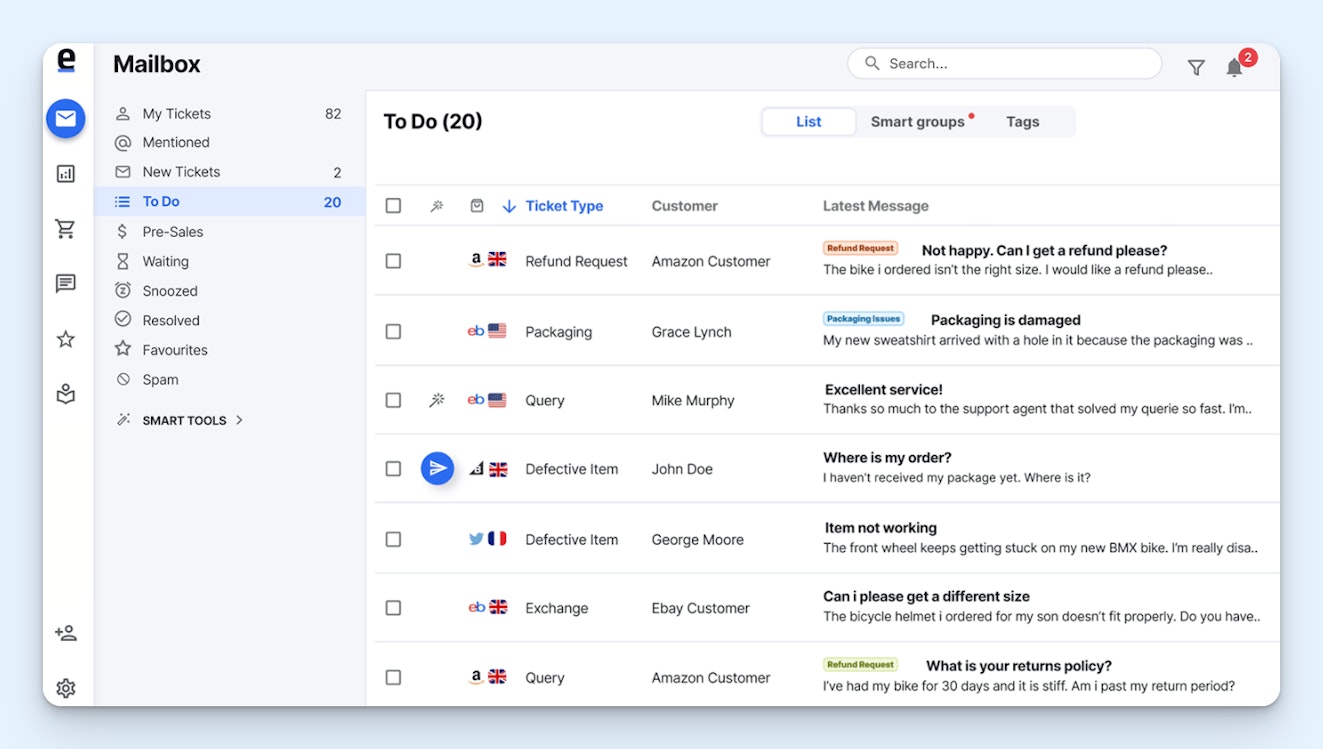
If you sell your products on marketplaces like Amazon, eBay, Etsy, and Walmart, eDesk is a great help desk to consider. It brings order details and support requests from each of those marketplaces into your help desk so you can manage them in a central queue alongside requests received over email, live chat, phone, and social (Facebook, Instagram, WhatsApp, and TikTok Shop).
The TikTok Shop integration on eDesk is more robust than Gorgias'. In addition to letting you see and respond to TikTok Shop interactions, eDesk's integration also lets you initiate conversations with customers, view all of your store's orders, add order information to replies, and process returns, cancellations, and refunds without leaving your help desk.
As far as marketplaces go, eDesk's SLA feature helps you adhere to Amazon's strict policy that all customer questions must be responded to within 24 hours. The system also lets you request reviews from buyers on Amazon even if you've been blocked from sending proactive messages previously, and there's an automated feedback feature that can help you get more feedback ratings on eBay.
eDesk's key features for ecommerce teams
View and respond to requests from email, live chat, and social media from a single system (voice is also available with the eDesk Talk add-on).
Integrate with Shopify, WooCommerce, BigCommerce, Magento, Prestashop, and Shopware.
Manage requests from TikTok Shop, Amazon, eBay, Walmart, Etsy, and Mirakl in your help desk.
Create general SLAs as well as channel-specific SLAs for marketplaces with stricter policies.
Deploy an AI agent and create a knowledge base for self-service support.
Send review and feedback requests to customers to boost your visibility on marketplace sites.
Pricing
Free trial available. View eDesk's current pricing.
4. Gladly – Best for large retailers selling both in person and online

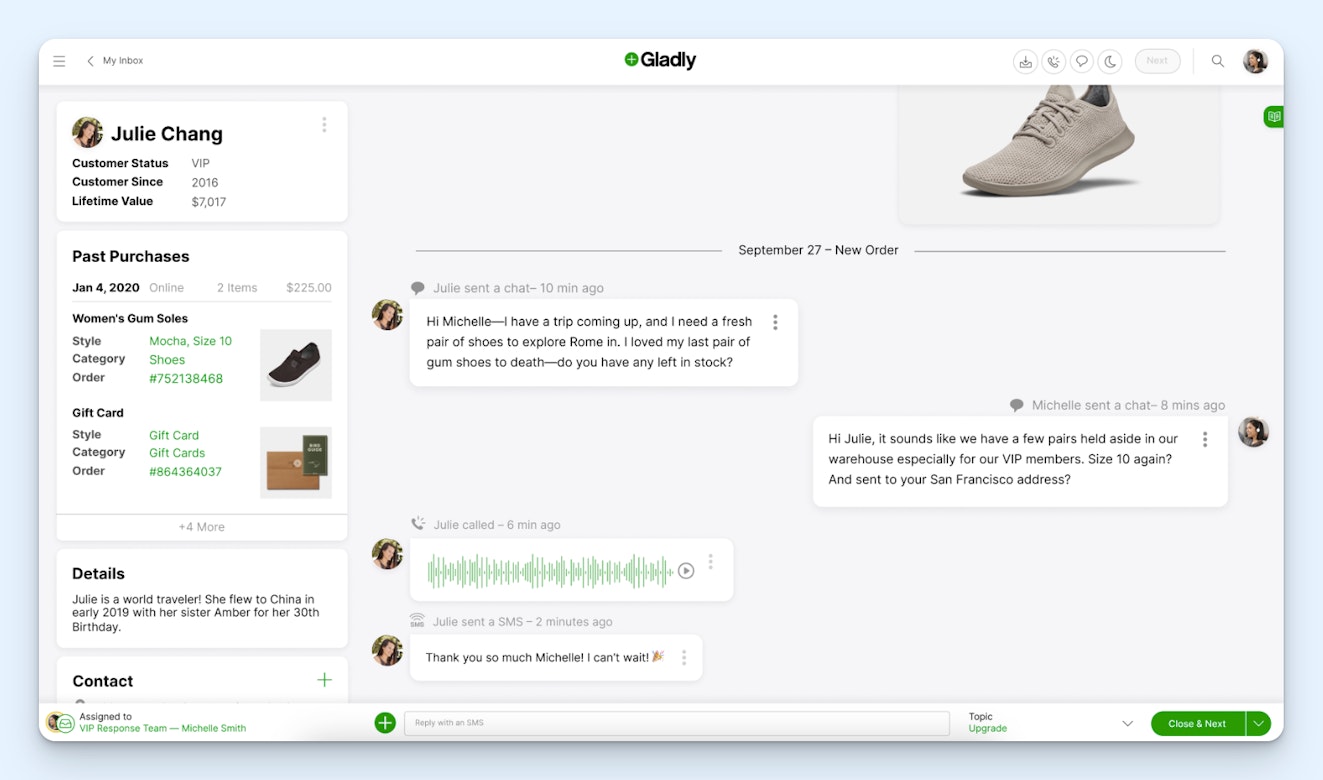
Most help desks are built around individual interactions. A customer sends in a request, and a support team member resolves it. Gladly's approach is a little different — more like a CRM than a traditional help desk. It's built around customer profiles. Every interaction a customer has with your brand is tied to a single, lifelong conversation thread on that customer's profile.
When your customers are bouncing between your website, your app, and your physical stores, having a unified view of every interaction is really helpful. If a customer calls in about something they purchased, the agent can see everything in one place — past purchases, previous support conversations, preferences, and loyalty status — regardless of which channel those interactions happened on.
Gladly also has a routing feature called People Match that's more sophisticated than traditional rules-based routing systems. It's able to take multiple factors into account, such as the customer's sentiment, loyalty status, and lifetime value; the criticality of the request; and how experienced an agent is. It calculates a point value based on all of those factors and then uses the total points to route and prioritize requests appropriately.
Finally, Gladly's voice AI tool can be useful for large brands delivering call center support. Its AI chatbot can be used to resolve phone queries, providing answers to questions and even making changes to orders as needed. When the AI can't resolve the customer's issue, it hands the call off to a human team member with all of the context from its conversation so customers don't have to repeat themselves.
Gladly's key features for ecommerce teams
Deliver email, live chat, voice, SMS, and social (Facebook Messenger, Instagram, and WhatsApp) support from a single system.
Integrate with Shopify, BigCommerce, Magento, Endear, Spree, and Swell.
Deploy AI agents to answer customers' questions and perform actions over email, chat, voice, SMS, and social.
Use People Match to route customers to the best-suited agents, and prioritize requests based on a wide variety of factors.
Access a lifelong conversation timeline for each customer that spans every channel.
Get AI-generated conversation summaries to reduce after-call work and to help team members quickly get up to speed on long interaction histories.
Pricing
No free trial offered. Contact Gladly for pricing.
5. Shopify Inbox – Best for small businesses using Shopify

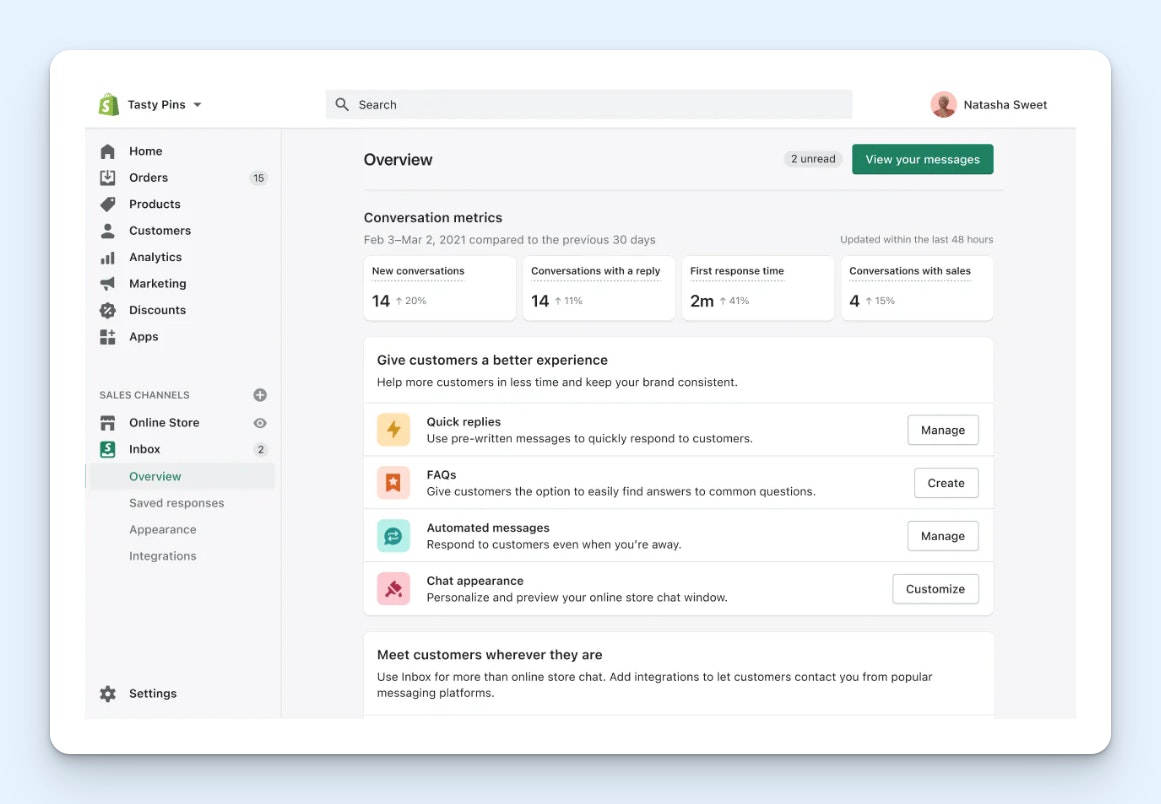
If you're a small Shopify store, Shopify Inbox is a solid starting point. It's completely free with every Shopify plan and works well for merchants that don't need a robust help desk.
Shopify Inbox adds a chat widget to your storefront that lets customers reach out to your team. When a customer starts a conversation, you can see what products they've viewed, what's currently in their cart, and their past order history — all right alongside the chat. If your team can't get back to the customer quickly, the system will send your reply to the customer as an email.
As far as enabling self-service, the chat widget can display instant answers — pre-written responses to common questions that customers can tap on to get answers. There's also a built-in order tracking instant answer that lets customers check the status of their orders without involving your team at all.
In the inbox, your team has access to a handful of tools that make managing chats easier. You can assign chats to specific team members and block senders that are spamming you. Additionally, the platform's AI copilot generates suggested replies to customers' questions based on your product listings and store policies so you can respond faster with one-click answers that can be sent as-is or edited before sending.
Shopify Inbox's key features for ecommerce teams
Publish a chat widget on your Shopify site that lets customers reach out to you with questions.
Manage requests in a shared inbox, assign requests to specific individuals, and use AI to generate replies instantly.
Build an instant answer that lets customers check on the status of their orders without involving your team.
Publish FAQs that display in your live chat widget.
View customers' order details in a profile that appears alongside chat requests.
Add text, images, videos, discount codes, and links to products in your replies.
Pricing
Included for free on all Shopify plans.
6. WSDesk – Best for small businesses using WooCommerce

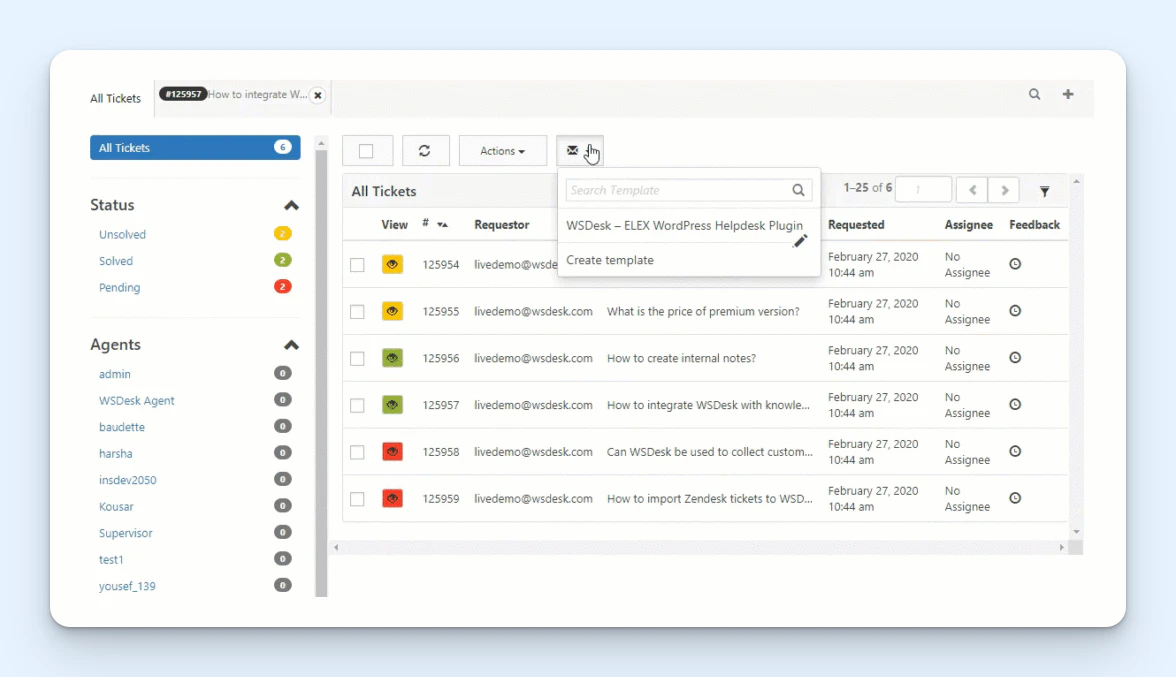
WSDesk is another lightweight option, like Shopify Inbox, but this one is built for teams using WooCommerce. It's a plugin that adds a help desk tab to your existing WordPress interface so you can manage your website and your support queue from the same place.
Customers can create tickets in WSDesk by either filling out a form on your website or sending an email to your dedicated support email address. Your team will be able to see all tickets that have been created in WSDesk's WordPress tab, you can assign tickets to specific team members, and you can also create custom views that allow team members to filter the tickets they see in their queues.
You can also tag tickets, change their statuses, and view reports showing things like average time to resolution, number of tickets received per day, and number of tickets with a specific tag. Create a library of canned responses to reply to FAQs quickly, and set up rule-based automations that can do things like send alerts to team members or close tickets after a period of inactivity.
WSDesk's WooCommerce integration pulls customer order data into the ticket sidebar — including order numbers, total number of orders, and total purchase amount. There's also a WooCommerce-specific reports tab that shows tickets broken down by product and product category, which can help you spot items that are generating a disproportionate number of support requests.
WSDesk's key features for ecommerce teams
Manage support tickets directly within your WordPress admin.
View WooCommerce order details (order numbers, purchase totals, and order count) on tickets.
Set up rule-based automations to take actions on tickets automatically or send alerts.
Create canned responses for quick replies to frequently asked questions.
Access reports on response times, ticket volume, agent performance, and WooCommerce-specific breakdowns by product and category.
Add your own features to the plugin; the plugin is open-source and can be edited.
Pricing
Free version available. View WSDesk's current pricing.
7. Outvio Desk – Best for consolidating shipping, returns, and customer support into a single platform
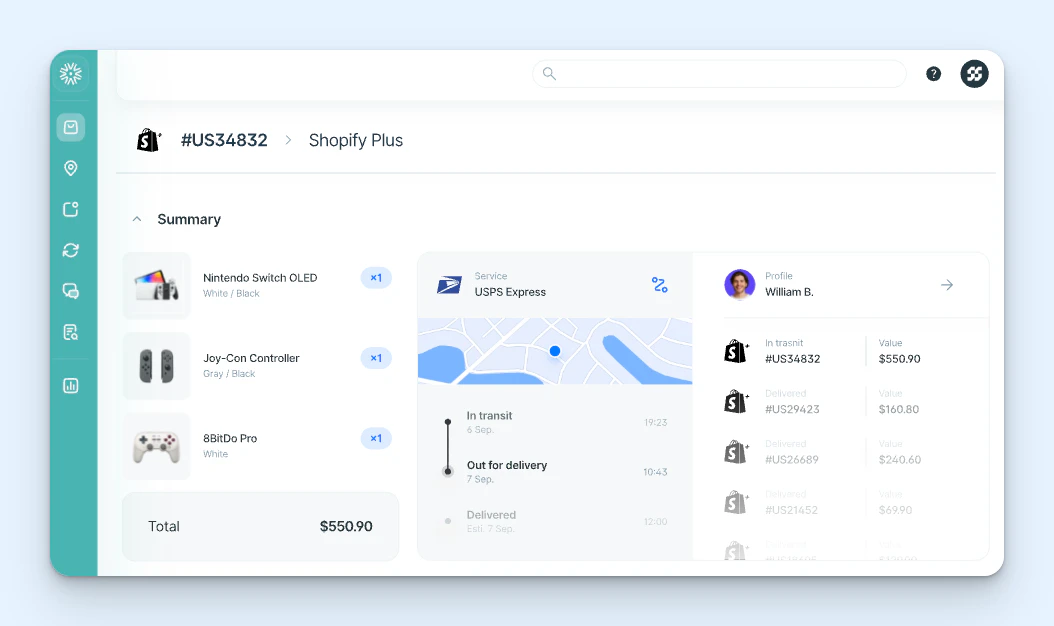
Outvio is an all-in-one ecommerce operations platform that brings shipping, order fulfillment, tracking, returns, and support management (via Outvio Desk) into the same system.
The advantage of this approach is that your support team has access to logistics data without having to rely on integrations. When a customer writes in about a delayed package, your agent can see the live tracking status, which carrier is handling it, and where the shipment is. If a customer wants to return a product, the agent can initiate the return, generate a shipping label, and trigger an exchange.
Outvio also includes a self-service portal where customers can initiate returns and exchanges on their own. You can customize the portal to match your branding, set up rules that dictate which products are eligible for returns and within what timeframe, and even suggest product exchanges or recommendations during the return flow to try to prevent lost revenue.
As a help desk, Outvio Desk lets you manage email, live chat, phone, and social (Facebook Messenger, Instagram, and WhatsApp) support requests. You can route tickets automatically, create templates with dynamic fields to reply to order status requests quickly, and view reports to measure performance and track trends.
Outvio's key features for ecommerce teams
Manage shipping, tracking, returns, and customer support from a single platform.
Deliver email, live chat, social, and voice support.
Integrate with more than 30 CMSs like Shopify, WooCommerce, BigCommerce, Magento, and PrestaShop as well as 100+ shipping carriers.
View live shipment tracking data, carrier details, and order history alongside support conversations.
Launch a self-service returns portal where customers can initiate returns and exchanges.
Pull comments from Facebook and Instagram into your shared inbox and reply to them.
Pricing
No free trial offered. View Outvio Desk's current pricing.
How to choose the right ecommerce help desk for your team
The best ecommerce help desk for your team depends on how you sell, where you sell, and what your support workflow looks like today. To find the right option for your needs, start with these questions:
Where do your orders live? If you've built your own order management or fulfillment system, Help Scout's API and webhooks let you connect all of your systems to your help desk. If you're running everything through Shopify, Gorgias gives you the deepest integration with your order data. If you sell on marketplaces like Amazon, eBay, or Etsy, eDesk is a great choice.
How complex are your needs? If you're a small shop that just needs a way to chat with customers and answer quick questions, Shopify Inbox or WSDesk will get the job done without high costs or unnecessary complexity. On the other hand, if you're a large retailer with physical and online stores, Gladly's CRM-like approach and intelligent routing are built for enterprise scale.
Where does support end and operations begin? Most help desks are standalone products that connect to your shipping and return tools through integrations. If you'd rather have everything in one system, Outvio bundles it all together so your team isn't toggling between platforms.
No matter which tool you choose, the goal is the same: to give your team the context and tools they need to resolve customer issues quickly and personally. The right help desk makes that easier by putting order details, conversation history, and the ability to take action all in one place so your team can spend less time switching tabs and more time helping customers.
Jessica Greene
Jessica Greene is a Help Scout alum, where we make excellent customer service achievable for companies of all sizes. Connect with her on LinkedIn or through her website.