Creating a Great Customer Self-Service Experience in 2026



It’s midnight, and one of your users is hitting an issue with your reporting functionality. Your support team isn’t online, so there’s no way for them to get immediate help from a human. They have two options: wait until morning and lose momentum, or try to find the answer themselves.
What happens next depends entirely on your self-service experience.
If you have a help center that’s well-organized, updated, and easy to search, they might find a clear article that gives them a helpful answer in a few minutes. Boom. Problem solved, customer happy, and your support team never even knows there was an issue.
But if your customer self-service experience is clunky, outdated, or nonexistent, they might spend 20 frustrating minutes searching and troubleshooting before giving up. They’re upset, your support team gets an angry message, and maybe your customer even starts looking at alternative solutions.
That’s not great.
In 2026, the question isn’t about whether you should offer self-service or not. Your customers already expect it.
The real question is whether your self-service experience is easy, intuitive, and genuinely helpful when customers need it.
This guide covers what great customer self-service looks like today, the channels and tools that support it, and the practical steps you can take to build a self-service experience that works for both your customers and your team.
What is customer self-service?
Customer self-service is a catch-all term that describes any way customers can find answers or solve problems on their own without needing to contact your support team. It’s a combination of tools, content, and processes that enable customers to get help on their own terms.
Think of it as the foundation of modern customer support, giving customers great experiences while helping customer service teams scale sustainably.
Self-service experiences come in many shapes and sizes, but they often include these elements:
A searchable knowledge base.
In-app messages, tooltips, or walkthroughs that guide customers while they're using your product.
AI chatbots that can route questions, surface relevant articles, or answer questions automatically.
Community and forum spaces where customers share answers and best practices.
Step-by-step video tutorials and product tours.
But what ties all of these together?
Intent.
Self-service exists to make customers feel empowered, not dismissed. When someone's looking for help, your goal is simple: Get them that help and move them forward as quickly as possible.
A strong self-service experience reflects the same values as great one-on-one support. It's friendly, clear, and genuinely helpful. The tone feels conversational and on-brand. The articles and other resources anticipate follow-up questions. The design feels like part of the product, not some disconnected afterthought.
What are the benefits of offering customer self-service?
Great self-service should be about enablement, not deflection. Building out an excellent self-service experience is a core part of the customer experience, and it brings benefits for your customers, your support team, and your whole company.
For your customers
Your customers bought your product or signed up for your service to accomplish some kind of goal. When they have an issue, it’s a speed bump on the road to achieving that goal. By offering a great self-service experience, you enable them to get back on track ASAP.
Self-service delivers answers in seconds or minutes, not hours or days. Giving customers a way to get an immediate, easy answer to their questions shows that you’ve put thought, time, and resources into supporting them and helping them be successful.
That’s how you earn long-term trust and customer loyalty.
For your support team
A great self-service system can handle hundreds of repetitive questions automatically, all at the same time. It’s far more scalable than having human team members field every question, and it allows you to serve more customers without sacrificing service quality. It also means your team has time for the more complex or emotional issues that really need a human touch.
Self-service also makes customer service roles more enjoyable. Explaining how to reset a password for the tenth time in a single day gets old. By enabling customers to solve these easier issues through your help center or a chatbot, your team members can focus on work that's actually fulfilling, such as solving nuanced problems, building customer relationships, and surfacing customer feedback to your product team.
A great knowledge base can also make onboarding new agents faster. Since those resources already exist for customers, they’re a great resource for new team members to learn and reference, creating consistency from day one.
For your entire company
Great self-service benefits everyone, not just your support team.
Self-service creates a single source of truth that every team can use. Product teams spot friction by tracking which help articles get the most views or lowest satisfaction scores. Marketing uses the questions customers ask your chatbot to inform messaging and content. Sales shares how-to guides during demos to help prospects understand your product's features.
Self-service also changes how your company scales. With the right self-service experience, you don’t need to scale your support headcount linearly as your customer base grows. The same system that supports 1,000 customers can support 10,000 (although it’ll evolve as your company grows).
While it’s hard to measure, there’s also a strategic benefit to investing in self-service. When customers can help themselves effectively, your entire organization can focus on building better products instead of constantly spending resources on minor questions and issues, helping to transform customer support from a cost center to a key revenue driver.
It's a trust-building tool that shapes how customers feel about your company every single day.
The most common customer self-service channels (and how they’re evolving)
No single tool defines self-service. While a knowledge base often sits at the center of a self-service offering, the strongest teams use a mix of self-service channels that fit how their customers actually work.
Keep in mind that you don’t need to offer every self-service channel out there. The right channels for your company are the ones that best match your product and your customers’ preferences.
What matters most is consistency: making sure each channel and touchpoint include the same tone, clarity, and intent to help. Each piece of the self-service machine should fit together seamlessly.
Knowledge bases


A knowledge base is the backbone of every good self-service system. It gives customers a clear, searchable library of documentation detailing how your product works.
A well-structured knowledge base also makes your agents more efficient, enabling them to share links to help articles in live chats or emails instead of typing out every how-to step every time someone asks for instructions.
Many modern knowledge base tools also come with AI-powered search that helps customers find the answers they need more quickly, AI insights that help you identify articles that are outdated or unhelpful, and even AI content generators that create new knowledge base articles for you automatically.
Recommended Reading


In-app help

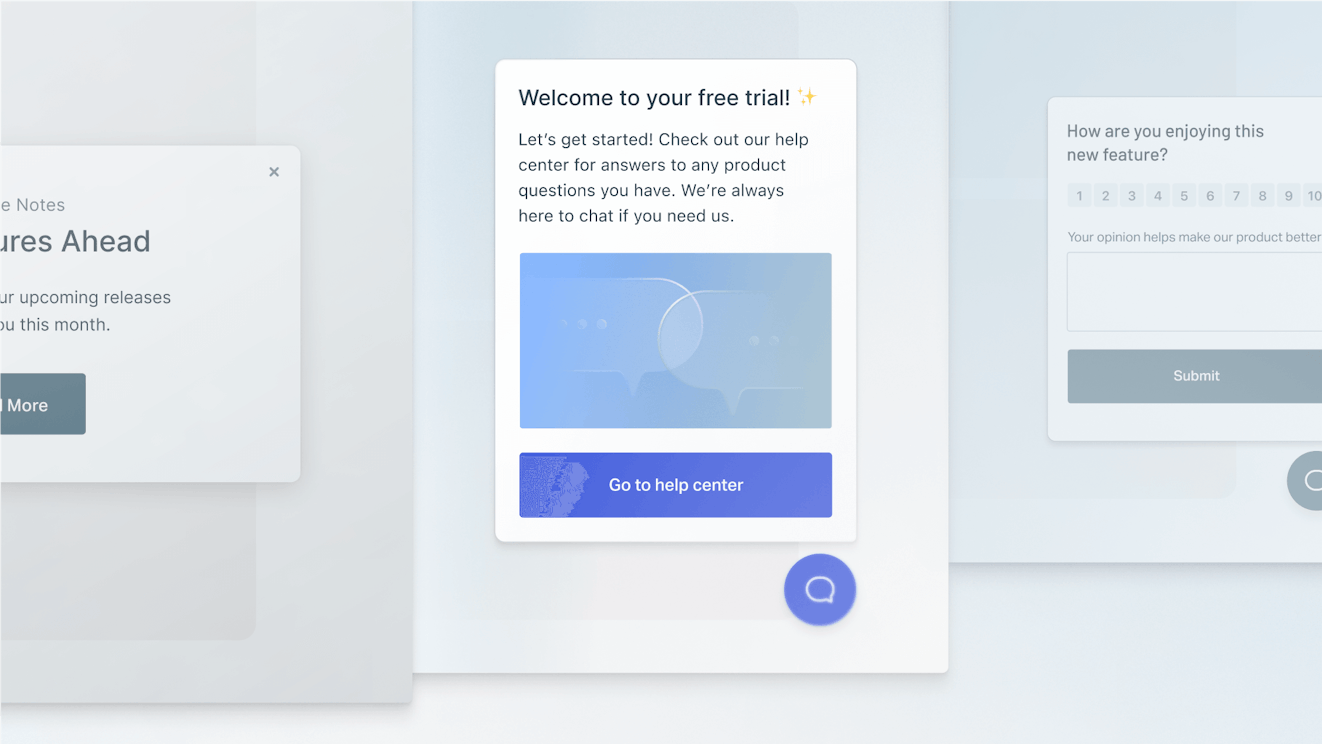
When support is needed, it’s best if customers don’t have to hunt for it. In-app help is a great example of that. By embedding things like tooltips, walkthroughs, and contextual messages directly into your app, customers always have resources right at their fingertips.
In-app help is a prime example of thinking about your customer journey and providing support and resources to help customers proactively.
Recommended Reading

Chatbots and AI assistants
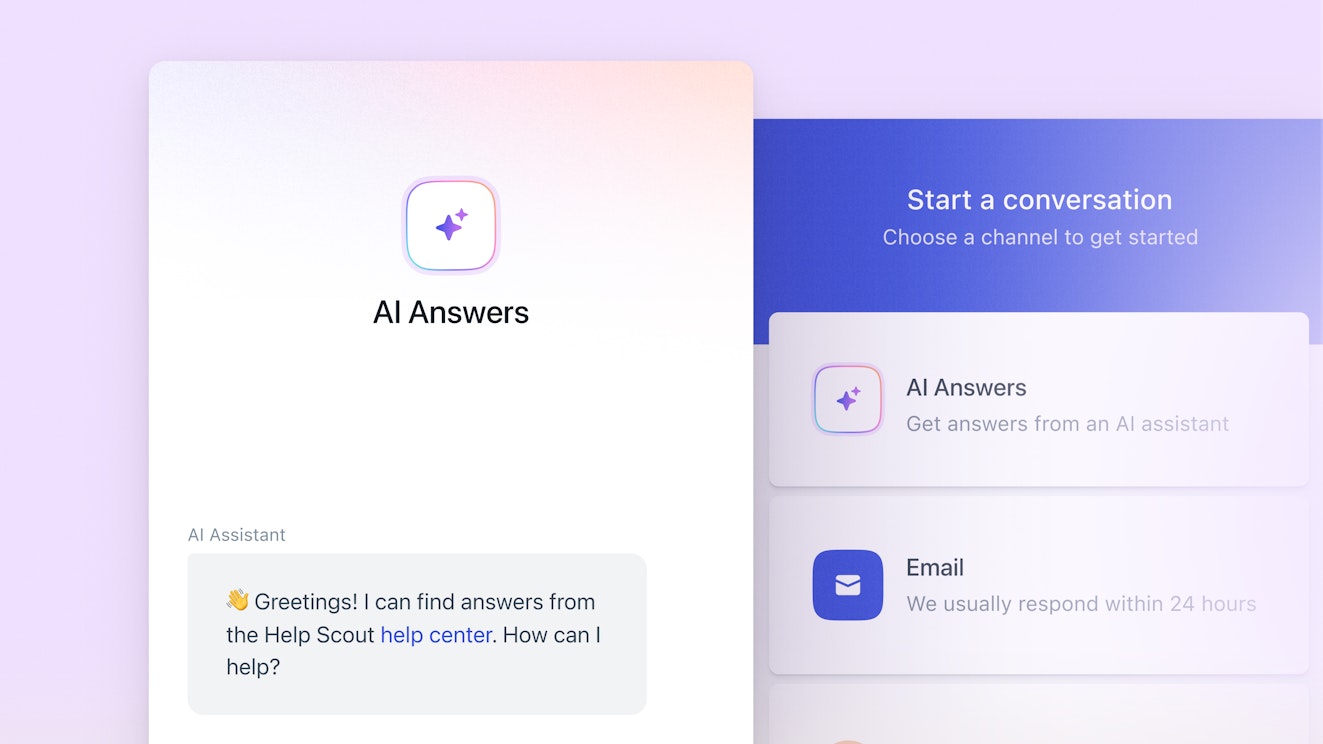
Customer service chatbots have matured a lot in the last few years, moving far beyond basic decision trees and canned replies. Today’s AI chatbots can better understand what customers are asking, search your help content in real time, collect context, and provide detailed, conversational answers.
For many teams, this means a bot can now handle simple, repetitive questions before they reach your inbox. More advanced bots can also autonomously process simple refund and account closure requests, too.
Community forums and peer support


Communities are still valuable, especially for products with strong user bases. A well-moderated community gives customers a space to share advice and creative solutions that your team might never think of.
The best communities are searchable, organized, and moderated. They also create opportunities for customer advocacy and deeper engagement, which can build strong brand loyalty.
Video, visuals, and interactive tutorials


Visual content is becoming essential. Short video walkthroughs, animated GIFs, and interactive demos help customers learn faster than text alone.
While it’s possible to create entire training courses as written resources, many teams opt to pair text-based help articles with embedded videos or step-by-step tutorials. This hybrid approach helps people with different learning preferences and makes your knowledge base even more effective.
Recommended Reading

7 examples of great customer self-service
Let's look at what exceptional customer self-service actually looks like in the wild. These companies get it right because they focus on customer intent, not just content organization.
1. Help Scout: AI that supports, not replaces

![Beacon w/AI Answers [in-line blog image]](https://hs-marketing-contentful.imgix.net/https%3A%2F%2Fimages.ctfassets.net%2Fp15sglj92v6o%2F6bMVB10h9vl9FNFyZjKgur%2F89f4d46a9271fda1946b2eed323aaa7e%2Fimage1.png?ixlib=gatsbySourceUrl-2.1.3&auto=format%2C%20compress&q=75&w=873&h=582&s=468926b8c2b414c39871cf1b2bbb50f2)
Help Scout offers a good model for teams that want to use AI without creating barriers to getting human support. In Beacon, Help Scout's embeddable widget, customers can search knowledge base articles, get instant answers from AI, or choose to talk to a human right away. Nothing gets hidden, and nothing forces them into a bot loop.
When AI Answers appear beside “Email us” or “Chat with us,” customers understand that automation is an option, not a requirement. This keeps the experience efficient but still personal.
It also reinforces a core principle of modern self-service: Automation should make support easier, but customers should always be able to reach a person when they need one. When bots block access to a person, frustration climbs fast.
When customers use Beacon to search your knowledge base articles, it also pulls in article previews so customers can check whether a guide is helpful before opening it. That small design detail saves clicks and reduces frustration, especially for people in a hurry.
2. Notion: Context-aware help that meets you where you are
Notion's help center excels at progressive disclosure. When you search for something, you don't just get a list of articles; you get different types of resources, sometimes including a link to the specific section of an article that answers your question.

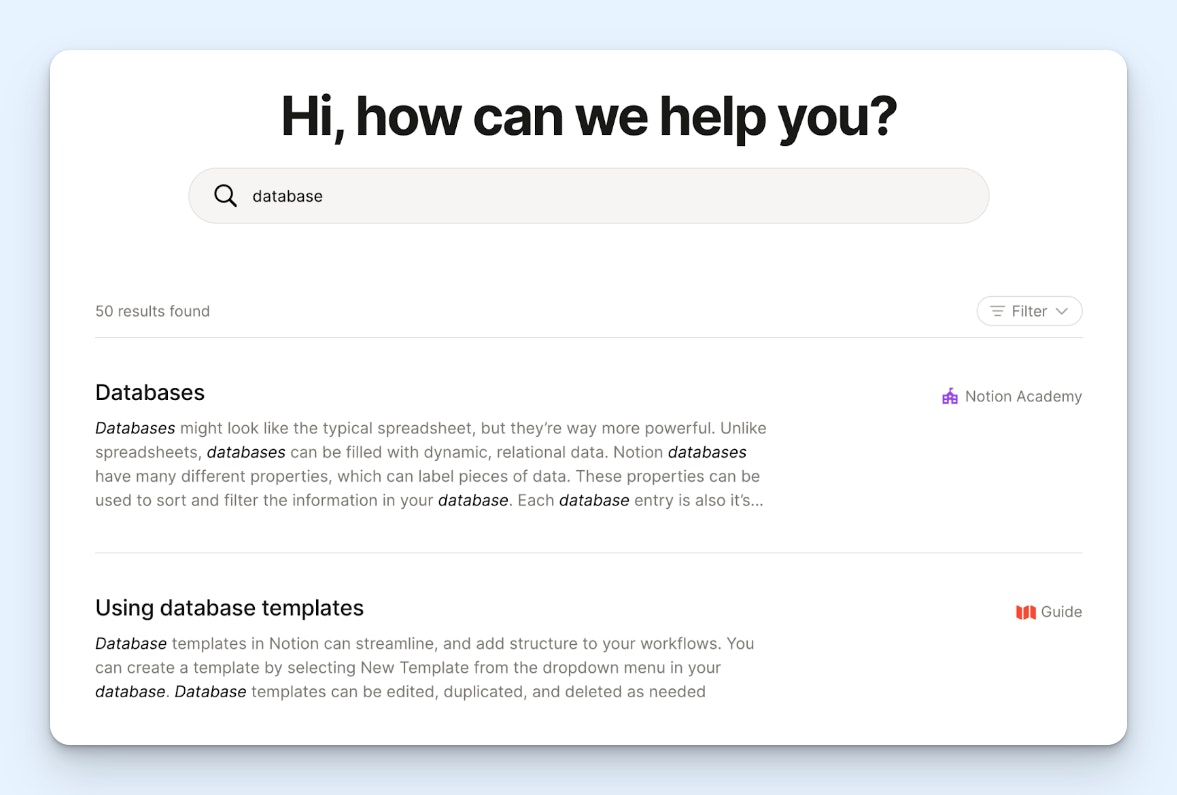
Notion also embeds contextual help directly in the product. Hover over a feature you haven't used yet, and you'll see a tooltip that explains it in plain language.
Finally, when you're logged into the platform, Notion also includes potentially relevant help articles directly on the home page.


3. Shopify: Visual learning that respects different styles
Shopify understands that not everyone learns the same way. Their help center combines written instructions with short video tutorials, annotated screenshots, and interactive product tours.


What really stands out is how they structure their articles. Each one starts with a quick summary of what you'll accomplish, then breaks the steps into clear sections with headings you can jump to. If you're trying to set up your first product listing, you can see the entire process at a glance or skip straight to the step where you got stuck.
Shopify also embeds chatbot functionality right at the bottom of the article, encouraging users to interact and ask questions, which can be a lot easier than reading the entire article.
Recommended Reading

4. HubSpot: An AI agent that resolves issues
One of the best parts of HubSpot’s self-service functionality is that their AI-powered chatbot is able to resolve some basic issues automatically. It doesn’t just share knowledge — it takes action.


While this functionality only works for certain request types and the bot sometimes encounters issues it can’t handle, it’s a small example of where self-service may be heading as AI agents continue to improve.
5. Articulate: Leveraging the power of community for self-service


E-learning software company Articulate has used a community forum to support users for years. The forum is so popular, it has over 52,000 posts.
While the Articulate support team helps moderate posts and chimes in to different discussion threads, it’s a great example of leveraging community for self-service. Each post is an opportunity for users to help one another, learn tips and tricks, and ultimately become more successful with Articulate’s product.
6. Linear: Self-service that mirrors the product’s simplicity


Linear’s documentation is clear, minimal, and incredibly structured. Each page focuses on one topic and breaks complex workflows into small, digestible pieces. There’s no extra fluff and no walls of text — just clean information that helps customers stay in the flow.
It’s a good example for teams that want to show expertise without overwhelming people. In many ways, the Linear help center matches the Linear product feel, so it’s a very consistent experience for customers.
7. Loom: Short videos that explain tasks in seconds


Loom uses its own product to power its help center. Many articles embed quick video explainers that walk through a feature from start to finish. This lowers the barrier for new users, especially people who prefer visual guidance over written steps.
Video-based support is becoming more common because it shortens the time it takes to learn something new. Loom shows how effective this can be when it is intentional and well produced.
Best practices for creating an exceptional self-service experience
Rome wasn’t built in a day, and neither are the best customer self-service experiences. Typically, a great self-service experience starts with making self-service a priority, then creating content and layering technology over time to make help easy to find.
The whole process requires knowing your customers, your product, and your end goals, but the tips below will set you on the right path.
Start by building a robust knowledge base
Your knowledge base is the core of your self-service experience. If you don’t have one, today is the day to start. Here are a few guidelines for creating a functional and helpful knowledge base:
Begin by listening to your customers to figure out what to prioritize. Review recent support conversations to identify the most common questions and frustrations.
Pay attention to the language they use. If customers say "delete my profile" but your article is titled "Deactivate your account," that mismatch may stop them from finding what they need.
As you write, aim for understanding. Use short sentences, plain language, and concrete examples.
Layer in visuals — screenshots, GIFs, and short videos — to show what words can't easily describe.
Make sure each article answers one specific question or walks through one process. If you have more to cover, create multiple articles and link them together. A customer who lands on one article should always know what to read next, whether that’s troubleshooting steps, advanced use cases, or related guides.
Recommended Reading


Meet customers where they are
Great self-service extends beyond your help center. Once you have a good library of help docs, make them accessible by embedding them in your product through tooltips, walkthroughs, and in-app messages that guide customers while they work.
Figure out what other channels make sense for your business and customers. Some customers might prefer community forums, where they can learn from peers. Others want chatbots that can surface relevant articles or route complex questions to your team. Video tutorials work well for visual learners tackling multi-step processes.
Each channel has different strengths and weaknesses, but the key is knowing your customers’ needs and meeting customers where they already are. Keep your tone and voice consistent across every channel — articles, chatbots, in-app messages, and live support. Customers should feel like they’re getting help from the same supportive team no matter where they are.
Always make help accessible
Make sure every part of your self-service experience is accessible. Use clear headings, legible fonts, high contrast, descriptive alt text, and captions for all videos. Accessibility isn’t a bonus; it’s part of making self-service usable for everyone.
Self-service should also empower customers, not trap them. Every aspect of your self-service experience should include a clear, easy path to human support when needed.
The best self-service integrates seamlessly with live support. When a customer does reach out, your team should be able to see which articles they viewed, which searches they tried, and what they already explained to your chatbot.

Providing this context helps agents seamlessly pick up right where self-service left off.
Measure what matters
Launch early and improve over time. To do that, build in ways to understand how customers interact with your self-service content and see where you need to improve. Some metrics might include:
Search-to-contact rate: How often do customers search and then still contact support?
Article feedback scores: Are customers finding articles helpful?
Popular articles: Which content gets the most traffic?
You can even bake in feedback loops across your self-service channels. Add "Was this helpful?" prompts to articles, or have your chatbot ask for feedback at the end of a chat. Check those insights regularly and make consistent improvements where needed.


Treat your knowledge base and self-service tools like living products. Review insights regularly, update unclear content quickly, and rebuild outdated guides before they cause friction. Continuous improvement is what keeps self-service accurate and trustworthy over time.
Recommended Reading

Self-service as part of the whole customer experience
The best self-service experiences can almost feel like magic. Customers find what they need, solve their problems, and move on. That simplicity is what makes it powerful and effective.
Great self-service respects your customers' time and autonomy. When someone hits an issue at midnight and finds a clear answer in seconds, they remember that moment. When your help content anticipates their next question, they notice.
For your support team, self-service creates space for work that matters. When repetitive questions are handled automatically or through self-service, team members can focus on complex problems, build deeper customer relationships, and find other ways to help your business.
If you’re just getting started with self-service, start small and expand from there. Pick one common friction point — onboarding, billing, or a confusing feature — and build excellent self-service around it. Track whether customers are finding answers and whether satisfaction improves. Use that feedback to guide what you do next.
Over time, those small wins compound into a self-service experience customers trust, shaping how they perceive your brand and how your support team operates and scales.
Mark Sherwood
Mark Sherwood is a CX strategist and support operations leader who helps teams scale without burning out or losing quality. He’s worked with SaaS and ecommerce companies to build sustainable systems, improve self-service, and streamline support workflows. Through SherwoodCX.com and consulting, he shares practical strategies for modern CX teams who want to grow the right way.