The 7 Best HIPAA-Compliant Help Desks and Ticketing Systems



When handling sensitive data like protected health information (PHI), your ticketing system must meet the same security and privacy standards that your organization upholds. Even a small compliance misstep can lead to fines and severe business consequences, so finding the right option for your team is a cross-functional challenge involving security, privacy, and compliance considerations.
To save you some time, we've put together this list of platforms that are designed to securely manage patient-related inquiries and data in accordance with the Health Insurance Portability and Accountability Act (HIPAA), ensuring PHI is encrypted, access-controlled, and auditable to maintain patient privacy. View a summary of the best HIPAA-compliant ticketing systems below, or keep reading for our in-depth reviews.
At Help Scout, we only publish deeply researched, human-written content. If you find our content to be as helpful as we strive to make it be, you can set us as a preferred source in Google so you'll see our content surfaced more often when you're searching.
| Platform | Summary | Starting Price for HIPAA-Compliant Plans |
|---|---|---|
Help Scout | Best for healthcare teams managing lots of email requests, Help Scout makes it easy to collaborate on responses, keep your inbox organized, and reply to requests faster. | Included in the Pro plan at $75/user per month or available as an add-on to the Plus plan |
Giva | Best for healthcare call center reps who are creating tickets for other teams, Giva makes it easy for everyone to see exactly what they need to take action on. | $69/agent per month for up to 10 agents; $89/agent per month for more than 10 agents |
Luma | Best for busy healthcare practices, Luma gives office staff tools to manage patient calls and text messages and provides patients with tools to self-serve scheduling and payments. | Contact for pricing |
ModMed | Best for large specialty practices, ModMed is a combined EHR and patient communication system that helps you manage every aspect of running an office and providing patient care. | Contact for pricing |
OhMD | Best for small healthcare practices that are struggling to manage patient texts and phone calls, OhMD is an affordable option with built-in AI that reduces the number of requests you have to manage. | $300/month |
Weave | Best for automating patient communications, Weave's AI features can answer patient phone calls, schedule appointments, and provide actionable feedback on calls handled by human reps. | Contact for pricing |
OneDesk | Best for IT support teams working in healthcare organizations, OneDesk combines ticketing and project management into one platform to accommodate complex, multi-task workflows. | $32.99/user per month |
1. Help Scout – Best for teams managing large volumes of email

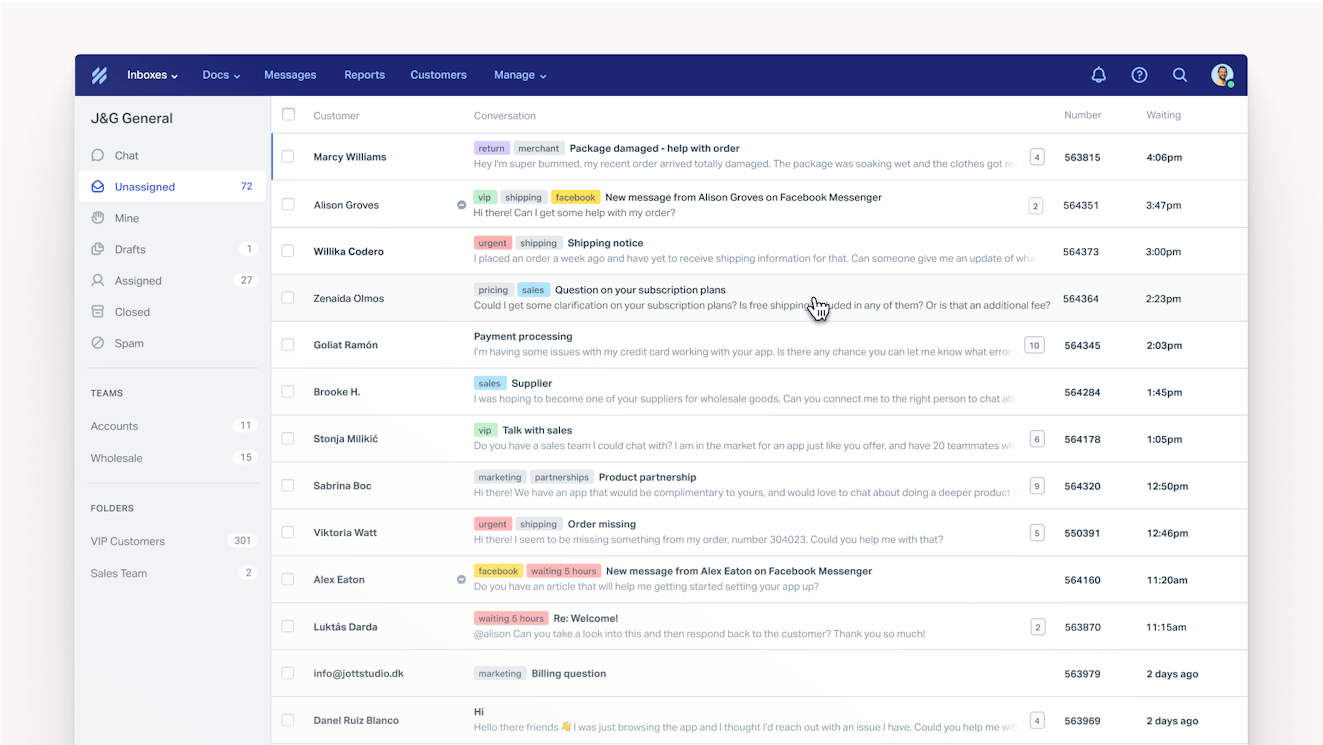
Help Scout replaces the chaos of trying to manage team emails in Gmail or Outlook with a shared inbox that's designed for collaborative work. It pulls all of your organization's shared email addresses (info@, billing@, providers@, scheduling@) into one place where every message is accounted for and nothing slips through the cracks.
You can create separate inboxes for different departments, surface patient context like contact details and prior conversations right alongside each thread, and build a library of saved replies to respond to questions in seconds. AI can draft initial responses based on your past conversation history, giving staff a head start on routine questions, while custom views keep urgent or specialized requests front and center.
Help Scout also gives your team tools to stay in sync without stepping on each others' toes. Conversations can be assigned to individuals or departments, and automatic routing balances workloads while cutting down on triage time. Collision detection prevents two people from replying to the same patient at once, and private notes let staff loop in a colleague or share context on a complex case before a reply goes out.
Built-in reports break down conversation volumes, response times, patient satisfaction, and team performance, making it easier to plan ahead. And if you find that your conversation volumes are overwhelming, there are features to reduce the number of emails your team receives. Build a knowledge base with answers to frequently asked questions, then launch an AI chatbot that uses the information in your knowledge base to answer patients' questions in real-time.
Best of all, none of this requires a long, painful rollout. Help Scout is powerful but intentionally easy to use, and most teams can be up and running in minutes with minimal IT involvement. Onboarding new front desk staff, patient service reps, and providers is also quick because the interface feels familiar from day one — no steep learning curve, no weeks of training.
Learn about HIPAA compliance in Help Scout.
Pricing
Free trial available. View Help Scout's current pricing.
Learn more about Help Scout:
2. Giva – Best for call center reps that create tickets from phone calls


If you have call center reps answering phone calls from patients and passing requests on to providers, billing teams, medical records departments, etc., Giva is a good option to consider. It's a highly customizable platform that lets you set up ticket creation forms that solicit the details that need to be collected so the person who's assigned the ticket has all of the information they need to respond.
Customizing the platform to fit your needs is easy. When you first log in to the platform, you're presented with a step-by-step guide that tells you what you need to review, how to get there, and how to make updates. Tutorials are always provided as text content, but many video walkthroughs are available as well.
When the people who are responsible for handling tickets log into the platform, they see a dashboard that can be fully customized to meet their needs. Pre-built widgets are available that show things like how many tickets have been assigned to you, and you can click on any piece of data in the dashboard to drill-down further (to see the specific tickets assigned to you, for example).
Managers can add performance widgets to their dashboards to monitor important metrics across the entire team, as well as build custom reports. Pre-built templates make it easy to get started creating reports, but the templates can be customized by adding data points and enabling filters. Reports can be saved in the platform for future reference, downloaded as a PDF or CSV, or emailed as a PDF once or on a schedule.
Learn about HIPAA compliance in Giva.
Pricing
Free trial available. View Giva's current pricing.
3. Luma – Best for busy healthcare practices

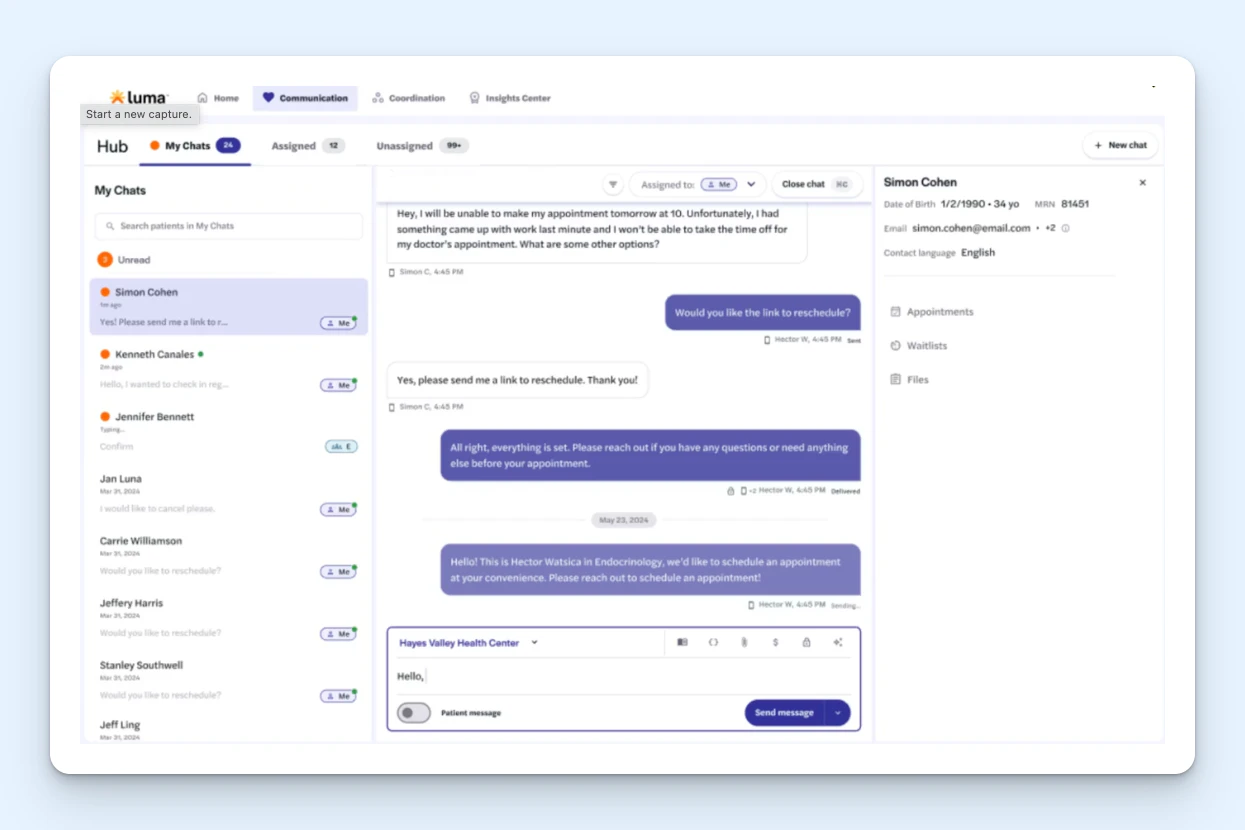
Luma is a patient engagement platform that's designed specifically for healthcare companies. It handles multiple aspects of patient communications — referrals, scheduling, cancellations, feedback, payments, insurance verification, and more — and it integrates with popular Electronic Health Record (EHR) platforms like Epic, Oracle Health, MEDITECH, eClinicalWorks, and athenahealth.
Luma's portal can be used on both the patient and provider side. Patients can log in to the portal to schedule, reschedule, or cancel appointments; request to be added to a waitlist; or make payments for services received. When cancellations occur, waitlisted patients receive email or text messages offering them the appointment. They also get email and/or text reminders for upcoming appointments.
On the provider side, phone/chat reps can use the portal to access all relevant details about a patient in a single pane: personal information, upcoming appointments or waitlist details, and any files that have been uploaded to the platform. When communicating with patients via SMS, you can use AI translation to translate incoming and outgoing messages, and you can also quickly send templated, prewritten replies.
Luma also helps with referrals and insurance verification. It gives you a form that other providers can use to refer patients to your office. Once the form is completed, the system automatically sends a scheduling link to the patient and adds the appointment to your schedule. For insurance verification, the system prompts the patient to submit their insurance card, then automatically verifies that the insurance is active.
Luma also offers an AI voice agent that can help reduce the number of phone calls people on your team have to manage. You can build workflows for the agents using the platform's no-code builder, letting it manage simple tasks like appointment scheduling and prescription refill requests. Your reps will see a full transcript of all AI interactions and can easily jump into the conversation when needed.
Learn about HIPAA compliance in Luma.
Pricing
No free trial offered. Contact Luma for pricing.
4. ModMed – Best for large specialty practices


ModMed is a robust system that helps you manage every aspect of your medical practice. It's a combined EHR, patient communication system, and practice management platform that's built to cater specifically to different types of medical practices, with features like practice-specific ICD codes for allergists, dermatologists, ENTs, gastroenterologists, OBGYNs, orthopedists, podiatrists, urologists, and more.
Like Luma, ModMed gives your patients tools to self-serve scheduling, but it expands on that by allowing them to fill out required forms before their appointment, check in when they arrive for their appointments, and upload documents like proof of insurance. Patients can also make payments through the system and view test results. All of this can be done over SMS or through ModMed's patient portal.
If patients don't have mobile phones they can use to fill out paperwork, you can download the ModMed app onto a tablet so they can use that to fill out the paperwork (no more typing in handwritten intake forms), and the information is automatically added to your EHR. Since ModMed is both an EHR and patient communication system, it serves as your complete system of record — no integrations required.
ModMed's platform can also be used to communicate with patients via text, web chat, and phone. Patients can switch from phone calls to text messages as needed, and calls and voicemails can be automatically transcribed into text for quick review. ModMed also offers a telehealth module for providers who want to offer video appointments. Patients can click a link in the portal or through a text message to join the call.
On the practice management side of things, you can use ModMed's Scribe 2.0 feature to automatically compile clinical notes based on appointments. Its AI listens to the conversation during the appointment and translates that natural language into visit notes. Providers simply review what was added and then finalize the notes after the appointment.
Learn about HIPAA compliance in ModMed.
Pricing
No free trial offered. Contact ModMed for pricing.
5. OhMD – Best for small practices that are overwhelmed with patient texts and phone calls

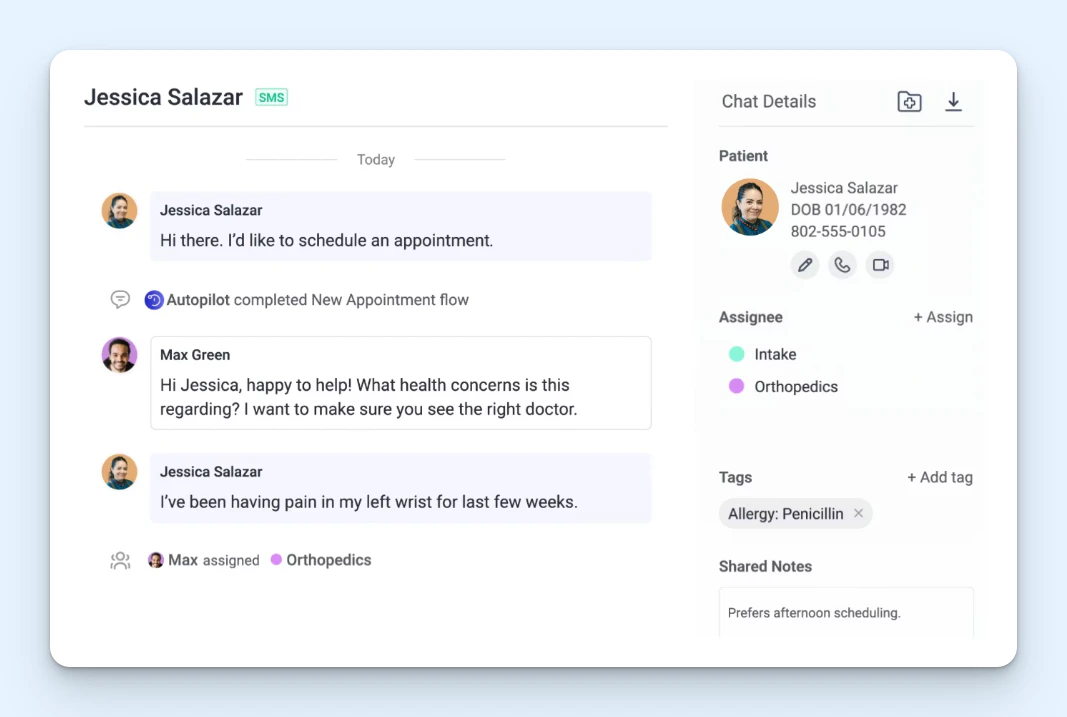
Getting back to more traditional patient-communication-specific options, OhMD is a great option for small practices that are struggling to manage text messages and phone calls from patients. It updates your practices' existing landline phone number to enable it to send and receive text messages, and your office administrators or call center reps can quickly type and send replies through OhMD's interface.
There's also automatic voicemail transcribing that lets you quickly follow-up on after-hours or missed calls, automatic routing and manual assignments so you can get messages to the right person/department to respond to them, and voice/video calling that lets you transition from a web chat or SMS thread to a live call. OhMD also integrates with EHRs like athenahealth, Veradigm, AdvancedMD, and Allscripts.
Where OhMD really shines is with its AI features that handle routine requests for you. You provide it with the scripts you use to handle requests like scheduling appointments, refilling prescriptions, and making referrals, and it will either provide the information the patient is looking for immediately (like your location) or collect the information a human needs to perform the task quickly (like scheduling an appointment).
Humans can jump into the call at any time to take over, and when the patient mentions something the AI isn't trained on or allowed to handle, it passes the conversation off to a human along with a full transcript. The AI agent can also be set up with decision trees to automatically route requests to the right person or department, eliminating the need for IVR systems or a person whose job is simply to route calls.
Finally, OhMD's plans are built so you only pay for what you need. All of its plans include HIPAA compliance. If you're not interested in the AI features and just want a better way to manage calls and texts, you can subscribe to its lowest-cost plan. You'll only need to upgrade to a pricier plan if you want AI assistants, EHR integrations, and/or access to the platforms' reporting features.
Learn more about HIPAA compliance in OhMD.
Pricing
No free trial offered. View OhMD's current pricing.
6. Weave – Best for automating patient communications


Weave is similar to OhMD in that it has an AI receptionist that answers phone calls for your team, but the system is more robust, allowing the AI to handle more tasks on its own. Where OhMD operates using a hybrid AI model — the AI can collect information to hand off to a human — Weave's agents can actually complete tasks for your team.
For example, you can use weave for patient scheduling and collecting patient information via online forms. Because of that functionality, AI agents are able to schedule appointments and update patient information without a human having to get involved. It also automatically sends upcoming appointment reminders to patients, and like ModMed, it can be downloaded onto a tablet so patients can fill out forms in the office.
Weave also comes with broadcast communication tools that let you do things like let patients know when your office will be closed or announce new specials you're running. You can set up automated text messages to be sent to patients on their birthdays or after appointments with requests for them to leave a review of your practice. There's even a team communication tool built in for internal communications.
AI can also be used retroactively to reply to missed calls, and it not only handles phone calls but text messages as well. When the AI can't help a patient, the call is transferred to a human on your team or sent to voicemail. When humans answer the calls, AI reads the call transcript after the call ends to analyze the patient's sentiment and uncover opportunities for your team to improve.
Learn more about HIPAA compliance in Weave.
Pricing
No free trial offered. Contact Weave for pricing.
7. OneDesk – Best for IT support teams


OneDesk can be used solely as a ticketing system or a project management platform, but combining both together makes it a powerful choice for IT support teams working in healthcare organizations where solving a request isn't always as simple as writing a reply to an email.
On the help desk side of things, the people in your organization can create tickets by sending you an email, filling out a form in your portal, or starting a live chat conversation. Replies are sent to the requestor's email, displayed in the live chat widget, or logged in the portal where the requestor can see all of the open and closed tickets they've raised for your team. The portal is also home to your knowledge base, if you choose to create one, where coworkers can find answers to frequently asked questions.
The help desk also comes with lots of standard features to streamline your workflows. Use canned responses to reply to requests instantly, send auto-replies to let requestors know their requests have been received, set up SLAs to make sure you're responding within agreed timeframes, and access reports to understand your team's performance.
On the project management side of things, tickets can be transformed into projects, and individual tasks can be added to them and assigned to different members of your team. There's time tracking built in if you need to track the amount of time spent on specific tasks and projects, and there are multiple options for viewing tasks, such as Gantt charts, Kanban boards, to-do lists, and calendars displaying due dates.
Finally, OneDesk can be either cloud- or self-hosted, so teams that want to retain control of their own data can opt for hosting the software on-premise.
Learn more about HIPAA compliance in OneDesk.
Pricing
Free trial available. View OneDesk's current pricing.
Making sure the system you use meets HIPAA compliance
As you're narrowing down the options you're going to consider, it's important to make sure that the system you choose will fully meet the HIPAA guidelines you have to adhere to. We've provided links in this article to each tools' descriptions of their HIPAA compliance standards, but it's also helpful to be aware of what makes a help desk HIPAA compliant in the first place.
To help reduce your risk of HIPAA violations, HIPAA-compliant ticketing systems should offer security features like individual user profiles with roles and permissions and IP restrictions for added security. Other features you should look for include:
Robust data security: Electronic data must be encrypted, and any hosting services used by your help desk provider must also provide a high level of physical security.
Reliable uptime: Patients must have reliable access to their ePHI, meaning you need to ensure that any provider you choose is dependable.
Data location: Data must be stored in the U.S.
Access restrictions: Communication platforms should offer ways to protect access to PHI, such as two-factor authentication (2FA), IP restrictions, SSL certificates, etc.
Business associate agreements (BAAs): The help desk you choose should be willing to sign a BAA with your company.
Keep in mind that following the guidelines above does not in and of itself make your organization or your help desk solution HIPAA compliant. Always consult with an expert when setting up new systems for your organization to make sure the system itself and the way your team uses it meet all HIPAA requirements.
Like what you see? Share with a friend.
Jessica Greene
Jessica Greene is a Help Scout alum, where we make excellent customer service achievable for companies of all sizes. Connect with her on LinkedIn or through her website.
Maryna Paryvai
Maryna is a results-driven CX executive passionate about efficient processes and human-centric customer support. With a track record of scaling ecommerce support operations, she firmly believes that exceptional customer experiences lie at the heart of every successful business.


