Proactive Customer Service: Benefits, Tips, and Examples




Last week, I ran into a problem with my bank’s mobile app. So I did what most customers do — I reached out to support.
The first few minutes were the usual back-and-forth. What operating system are you on? What app version? A standard troubleshooting script, except I was contacting them through the app, where that information could (and arguably should) have been surfaced to the rep automatically.
After a few rounds of questions, the support rep finally gave me the real answer: It was a known issue, and a fix was already on the way.
That’s where the frustration really landed for me.
It’s not because bugs happen; it was because I’d just spent time reporting something that wasn’t new, jumping through hoops that didn’t change the outcome, and taking up support capacity that could’ve gone to a customer with a solvable issue.
A simple, proactive message to affected users, or even a small in-app banner saying “We’re aware and working on it,” would have saved everyone time and unnecessary effort.
That experience is exactly what proactive customer service is designed to prevent.
Reactive support waits for customers to run into problems and ask for help. Proactive service anticipates those moments, communicates early, and reduces the need for customers to reach out in the first place.
In this guide, we’ll break down what proactive customer service means, explain why it matters, and share some practical strategies you can start exploring today to build a more proactive support experience at your organization.
What is proactive customer service?
Proactive customer service is an approach to customer support where you anticipate customer needs or potential problems and take action before customers have to reach out to your team for help.
You spot issues early, reach out first, and make things smoother without waiting for a ticket to land in the queue or for a customer to silently churn.
Let’s look at how this compares to more traditional reactive customer service.
Proactive vs. reactive customer service
Customer support teams have traditionally been built around managing a queue or inbox. A customer reaches out with an issue, and the support team helps resolve it. This is reactive support.
The thing is, support teams often receive hundreds of messages about the same problem at the same point in the customer journey, and the team has to respond to each one individually. Yes, that can still lead to a great experience. You might even achieve a 100% CSAT score via reactive support if customers feel supported and their issues are resolved.
But customers would be even happier if the issue hadn’t happened in the first place. That's the goal of proactive support.
For example, at one company I worked at, we noticed a large number of customers asking how to download their invoice shortly before or right after their first renewal. They likely needed the document to share with their finance teams, but it turned out the invoice download option wasn’t obvious in the app.
Were customers happy when the support team sent the invoice and showed them where to find it next time? Absolutely. Some even described it as above-and-beyond support, because they received the invoice immediately and learned where to go in the future.
But was it efficient? Not really.
By adding instructions on how to download invoices into the onboarding email sequence during the first month and moving the invoice download feature into Billing settings, where users naturally looked for it, we were able to nearly eliminate that category of incoming tickets.
That’s proactive customer service in practice.
| Reactive customer service | Proactive customer service |
|---|---|
Resolving customer issues after they happen | Preventing issues before they happen (or reducing their impact) |
Waiting for customers to reach out with a problem | Reaching out first or intervening early to prevent problems |
Customers are happy if their issue is resolved | Customers get a smoother, more frictionless experience |
Requires more staffing as ticket volume grows | Optimized for efficiency by reducing avoidable tickets |
The benefits of proactive customer service
Proactive support helps you create a smoother customer experience while making your support operation more efficient. It’s a win-win approach. Here are the key benefits you gain when you implement a proactive customer service approach.
Increased customer loyalty
Yes, the Service Recovery Paradox suggests that when a customer experiences an issue and your team resolves it well, it can increase loyalty. But in real-world scenarios, repeatedly running into problems with a company is just frustrating — and most of us can relate to that as customers.
That’s why preventing issues where possible is often a better long-term strategy for loyalty.
Instead of relying on recovery, proactive customer service reduces friction and builds trust by helping customers avoid problems altogether. Research shows that over 90% of customers appreciate companies that take a proactive customer service approach.
Higher support efficiency
As the invoice example from the previous section shows, proactive customer service is often more efficient because it eliminates avoidable tickets and gives your team more time for the cases where human support is truly needed.
By anticipating customer needs and addressing issues before they escalate, you can reduce the volume of incoming inquiries and free up your agents to focus on complex, unique, or high-priority problems. Proactive self-service options like chatbots, in-app messages, and robust knowledge bases can also deflect common questions, further reducing workload and helping customers get answers faster.
Lower support costs
When common issues and repeated questions are addressed proactively, ticket volume goes down. Customer service costs tend to follow. With fewer repetitive tickets to handle, teams can scale more sustainably, without needing to grow headcount at the same rate as the customer base.
There’s also a people benefit here: When agents aren’t stuck in an endless queue of repetitive requests, they’re typically more focused, engaged, and less stressed, which can improve both performance and employee retention.
6 ways to provide proactive customer service
Here are six ways you can implement proactive customer service at your organization.
1. Notify customers about known issues and their statuses


If there’s an outage, stock issue, or bug, it’s a good practice to tell customers right away. People are far more forgiving when they hear it from you first — and it saves everyone time when you notify them that there's an issue instead of leaving them to second-guess what’s happening, contact support, or churn quietly.
There are two ways you can notify customers of issues that might impact them: send them an email, or add a message about the issue in your app.
However, you don’t want to email all customers about every minor bug or issue. That can quickly become overwhelming and create frustration rather than be helpful. Focus on issues that are significant and likely to impact the customer experience — outages, product changes, etc. — and consider offering an unsubscribe option for customers who aren’t interested in product-status updates.
If you want to avoid inbox fatigue altogether, you could display a message about the issue on your website or in your app. Tools like Help Scout Messages can help you notify customers quickly — using either a standard message or a banner notification — so they know what’s going on and that you’re on it.
2. Invest in a robust knowledge base


Along the same lines, make sure important customer-facing information is clearly documented in your knowledge base. Research shows that 69% of customers want to resolve as many issues as possible on their own before contacting support, so well-written articles for common questions is a proactive way to deflect repeat tickets and help customers find solutions faster.
To get started, look at your most common support tags and the typical questions customers have at each step of the customer journey. You can also explore the KCS approach, where everyone on the support team contributes to the knowledge base content (with expert review before publishing).
Another option is to give support reps a tag like “Add to help center” so they can flag missing details, edge cases, or new learnings while they are working in the support queue. Your knowledge management team can later review the tagged tickets and update documentation as needed.
It’s also worth optimizing your help center for AI so customers can get quick answers without manually sifting through articles. Ideally, your help center should provide AI assistance directly so customers don’t need to switch tools and you don’t have to maintain multiple tools in your tech stack.
3. Ensure your team has access to key customer data when handling tickets


Imagine a customer reaches out about an order delayed by a shipping provider.
Reactive service is explaining what’s happening with that specific order.
Proactive service is using the customer context you already have to go further — for example, by identifying whether their other orders might also be affected and offering a refund or discount.
In a SaaS context, the same idea applies: Make sure your support team has access to relevant customer context like browser and OS details where possible, plus any upcoming renewals and recent conversations with account managers. This allows your support team to avoid unnecessary troubleshooting questions and helps the team flag churn risk or upgrade opportunities for account managers to act on.
You can store that data in your help desk and surface it to support reps while they’re handling tickets by using your software’s contact and company properties feature.
Taking advantage of your help desk’s integrations with CRM tools, ecommerce platforms, and marketing apps can streamline how that data gets populated. You can also choose to push data from your own systems via API or Zapier.
4. Add answers to the next logical question to your saved replies

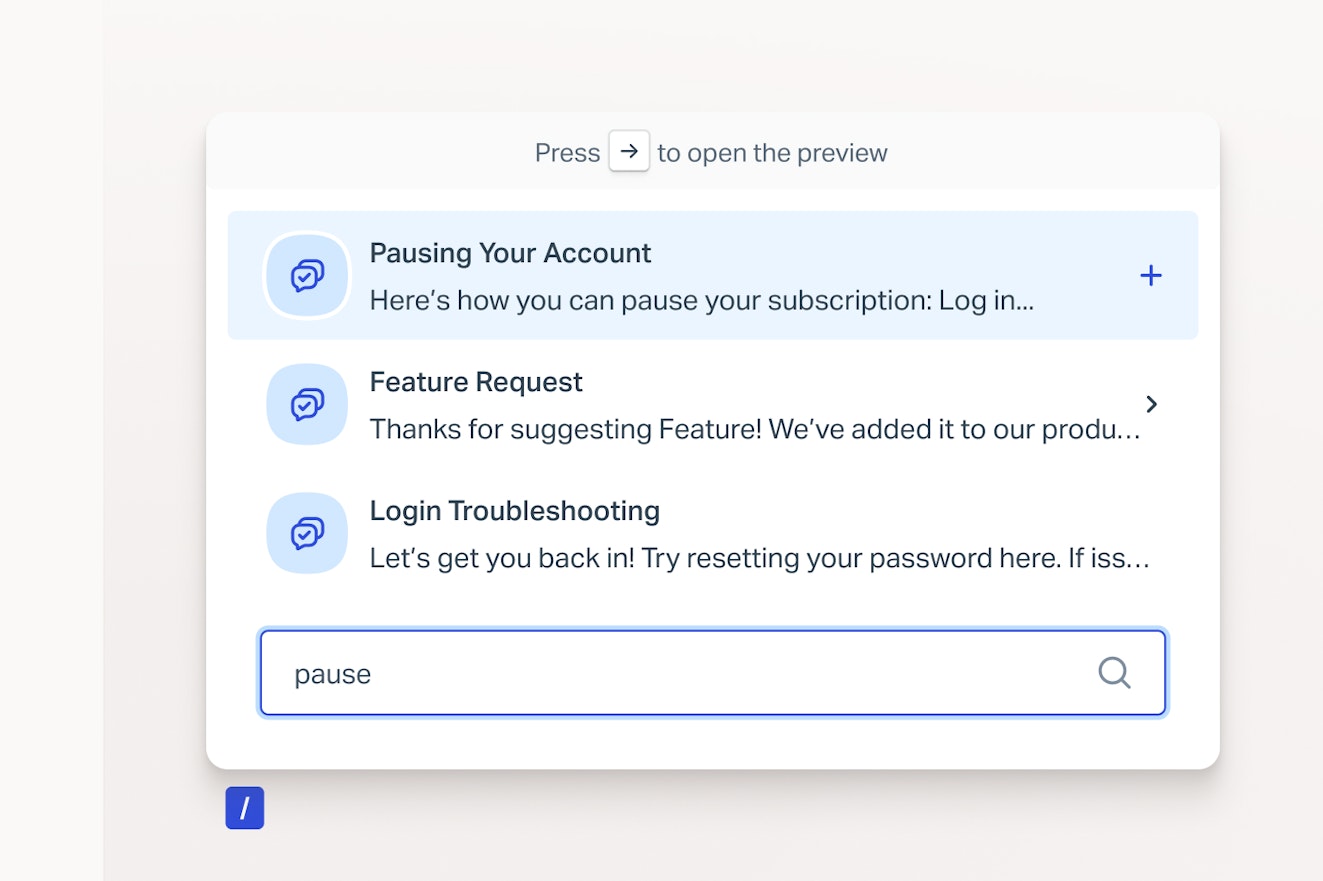
Whenever a customer reaches out, a proactive habit is to answer not only their immediate question but also the next question they’re likely to ask.
For example, if a customer asks how to create an account, the next logical step might be how to get started with the product. So alongside the direct answer, you could include a short demo video or your “Getting started” guide to reduce back-and-forth and to help them move forward faster.
If a customer asks about an out-of-stock item, a proactive response would include when it’s expected back and might offer similar in-stock alternatives in the meantime.
You can facilitate this by training support reps to consistently think one step ahead. Another idea is to bake this into your saved replies for common ticket themes, so the right resources and links are automatically included when a rep uses the relevant saved reply.
5. Prevent early support tickets with guided onboarding


When a customer first signs up for your product or buys from you for the first time, they’re likely to have questions: How does this work? What should I do next? How do I get the most value out of the product?
Leaving customers to figure it out on their own is a missed opportunity to engage them and build loyalty. While assigning an account manager to every customer would help, it’s not realistic in most cases (especially when the customer lifetime value doesn’t justify it).
The solution is to provide scalable onboarding guidance. Think onboarding emails, in-app tips, and short how-to videos that proactively answer the “What do I do next?” question. These resources can walk customers through key steps, show them how to use the product, and highlight what they should do early on to get the best results.
A simple way to decide what to include is to review support tickets from new customers. Look for patterns in the questions they ask in the first days or weeks, and make sure those answers are incorporated into your onboarding flow.
For web products, interactive walkthrough tools like Userflow can be used to show new customers how things work while they're using your product. For physical products, a clear, quick-start guide and, where appropriate, a short video on how to use and care for the product can go a long way. If you’re an ecommerce brand, you might include a postcard with a QR code to a getting started video in your product packaging.
Include these in onboarding or post-purchase sequences so customers get the most helpful information at the right moment and your team avoids an unnecessary support load.
6. Turn customer signals into proactive support
Proactive support can go a lot deeper than a great knowledge base or extra onboarding help to deflect tickets. Drops in usage, repeated errors, or a spike in failed payments are all signals you can act on early instead of waiting for frustrated messages to arrive.
For example, tools like ChurnZero let you monitor product usage in real time. You can use that to reach out when usage drops or when a user repeatedly hits the same issue — a quick “Want help getting this set up?” email can prevent churn. Similarly, if someone starts integrating a third-party tool and then stalls, you can proactively share tips or offer a short troubleshooting call.
On the billing side, setting up smart alerts in Stripe (or whatever payment system you use) helps you catch failed payments early and contact the customer to resolve it or arrange an alternative. In practice, these alerts are often most effective when they land in Slack, so the team can acknowledge ownership and keep visibility on what’s being handled.
Proactive messaging tools can be helpful by letting you trigger communications when certain conditions are met (like a failed payment or a new app installation). Depending on what fits the moment, you might show a relevant support article, start a live chat if someone spends a long time on a page, display a banner, or send a short survey to check in at the right time.
Another good time to reach out is when you see a positive signal, like a large order, an upcoming renewal, or a recently resolved complex support case.


A short check-in survey can help you understand how the customer is doing, how your team could support them better, and whether there’s anything else you can help with. These messages show you care, and they often surface small issues before they become bigger ones.
The goal is to show customers you’re paying attention and you’re there to help — not waiting for them to share a win to report the problem first.
Great examples of proactive customer service in action
So what does proactive customer service look like in practice? Let’s walk through a couple of real-world examples.
Help Scout’s proactive support with AI Answers
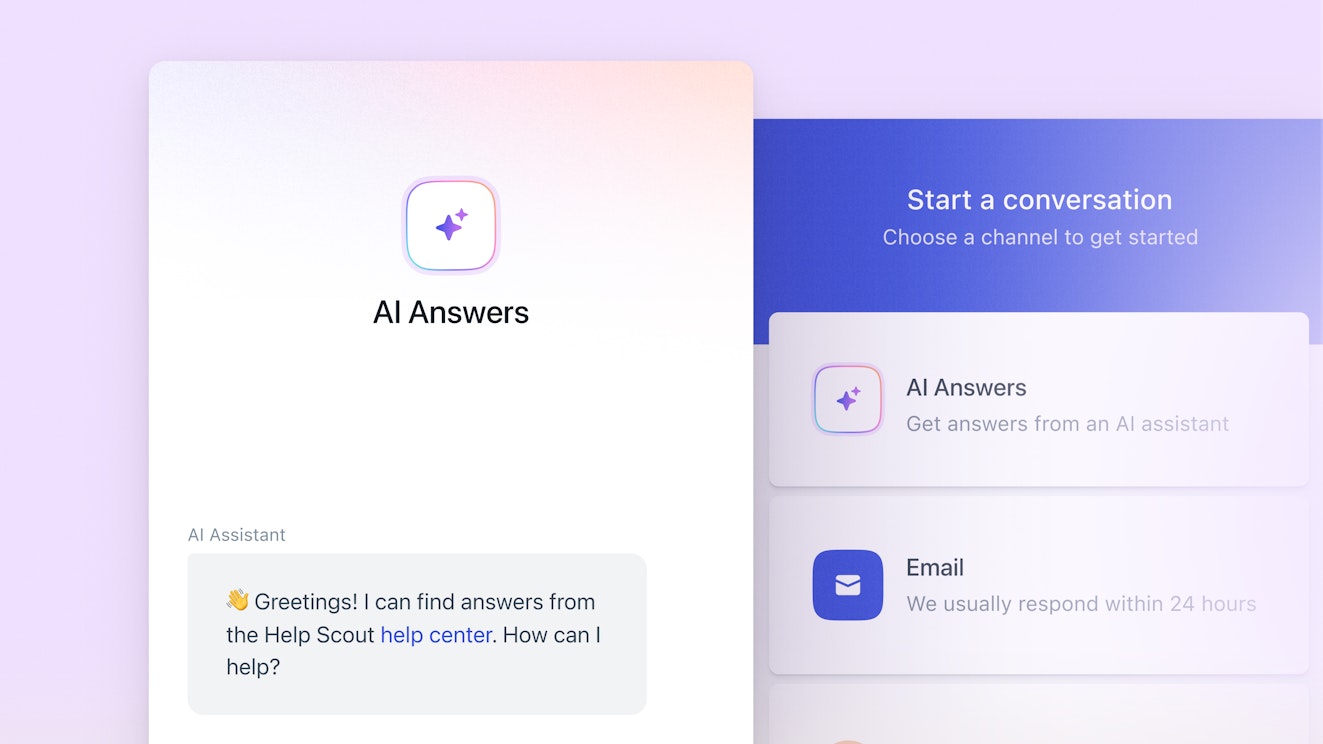
When customers reach out with a question that’s been asked 50 times before, there’s no need to route it to a human rep — it slows down resolution and isn’t the best use of your team’s time.
Help Scout is a strong example of streamlining the user experience with proactive self-service options. The team maintains an extensive knowledge base (running on Help Scout Docs) that covers every feature from multiple angles. On top of that, website visitors can access AI-powered answers based on the knowledge base articles, giving customers a self-serve way to get fast responses to common questions.
It’s a quick, low-friction way to learn about Help Scout features and plans and to get lightweight product support. If you prefer a more conservative approach, your customers can also search your knowledge base content directly or send an email to your support team using the same window.
Demio’s in-app onboarding tour
One of the best onboarding experiences I’ve seen is from Demio, a webinar platform. They use an onboarding product tour that guides users through the dashboard and shows what “using Demio” actually looks like by walking you through a demo webinar setup.
It answers the questions new users typically have right away: where to create and schedule events, how to host a session, how to manage attendees, and more.


What makes it especially effective is the timing.
The tour appears as soon as you create an account, so you don’t have time to second-guess what to do next or get stuck. Instead, it proactively guides you through the key steps and helps you create your first event right away.
Gorgias’ email notifications for every outage
When Gorgias was earlier in its journey, they took an approach to incident communication that I rarely see: Every time there was an outage, I’d receive an email — and then another one when things were resolved.
Some teams might consider that “too much” or worry that being this open could hurt the company’s reputation. I’ve even worked with companies that prefer to keep issues quieter for exactly that reason.
But in Gorgias’ case, it was genuinely helpful. I wasn’t using the product day-to-day myself, but I managed teams who relied on it. So when someone would Slack me asking what was going on, I already knew and could update the team immediately without having to hunt down a status page or piece things together from scattered reports.
As a user, I appreciated that level of transparency. Outages aren’t rare in SaaS. What builds trust is how clearly and proactively a company communicates when something goes wrong — and Gorgias’ approach in those early days made me respect them more, not less.
Proactive customer service best practices to keep in mind
As you plan your proactive customer service strategy, you’ll likely come up with additional ways to support customers ahead of time and new scenarios where you can delight them.
Here are a few best practices to keep in mind as you build a proactive customer service program at your organization:
Start with your highest-volume incoming requests. Look at the questions and issues driving the most reactive support volume, and use them as a roadmap for ticket prevention. Where possible, segment those insights by customer lifecycle stage so you can target the right proactive tactic to the right segment at the right time.
Create a robust QA system. Proactive support only works when it’s accurate and reliable. That means quality assurance, not just for support conversations, but also for your knowledge base, product tours, and in-app messages. Make sure articles are up to date, messaging is clear, links are not broken, and any variables or personalization fields are pulling the correct data every time.
Make sure your changes reduce friction rather than add it. A proactive program shouldn’t create yet another place for your team to check or another tool to consult when handling a simple ticket. Check in regularly with frontline teammates, and gather feedback to understand what’s working, what’s slowing them down, and what can be improved.
Build a feedback loop with customers. To be proactive, you need visibility into what customers struggle with, what they value, and where they still have questions. You can capture this through quick CSAT or customer effort surveys after resolving support requests and also through lightweight thumbs-up-thumbs-down feedback prompts at the bottom of your help center articles or product update emails. Response rates may be low, but the people who do respond often surface insights that lead directly to better proactive support.
Getting started on implementing proactive customer service
With these principles in mind, you’re ready to start building your own proactive customer service program. A simple way to begin is to pick one high-volume ticket theme or a common churn reason and find a way to address it proactively, before customers need to reach out or they quietly drop off.
That might look like offering a check-in call when a customer’s usage is declining in order to understand their use case and to make sure their setup is aligned. It could also be an in-app message pointing customers to a less obvious setting they often miss (especially if you don’t have the resources to redesign the UX right away).
At the same time, don’t try to automate everything, and don’t treat “eliminating incoming tickets” as the end goal.
High-priority, sensitive, or unique issues are often moments where human support matters most. When something goes wrong, customers still value real connection, and an empathetic response can go a long way in building trust and loyalty.
Maryna Paryvai
Maryna is a results-driven CX executive passionate about efficient processes and human-centric customer support. With a track record of scaling ecommerce support operations, she firmly believes that exceptional customer experiences lie at the heart of every successful business.